
On December 11, 2023, VMware was acquired by Broadcom. With this, major VMware licensing changes were made. VMware has reduced the number of offerings and has transitioned their bundles to subscriptions. The catalog of 160+ VMware products and bundles has been consolidated into just a few main bundles. Also, in November 2024, vSphere Essentials Plus was replaced by vSphere Enterprise Plus (a new and different product). In this article, we want to give you an overview of the new licensing models of VMware. Also, find a comprehensive 30+ questions FAQ-section below.
Summary – VMware Licensing After Broadcom (2026)
- Portfolio reduced: Broadcom cut VMware’s catalog from 160+ products to just 4 main subscription bundles
- No more perpetual licenses: All new VMware licenses are subscription-based
- Per-core licensing: Minimum 16 cores per CPU, which increases costs for many customers
- Essentials Plus discontinued: Replaced by higher-tier subscription offerings
- Clear product choice: vSphere (Standard or Enterprise Plus) or full bundles like vSphere Foundation (VVF) or VMware Cloud Foundation (VCF)
- vSAN licensing changed: Now licensed by capacity (GiB or TiB) via subscription, not per CPU
- Higher long-term costs: Most organizations should expect higher 3- to 5-year TCO, especially smaller environments
VMware Licensing Portfolio Simplification (2026): 4 Main Products + Advanced Services Add-ons
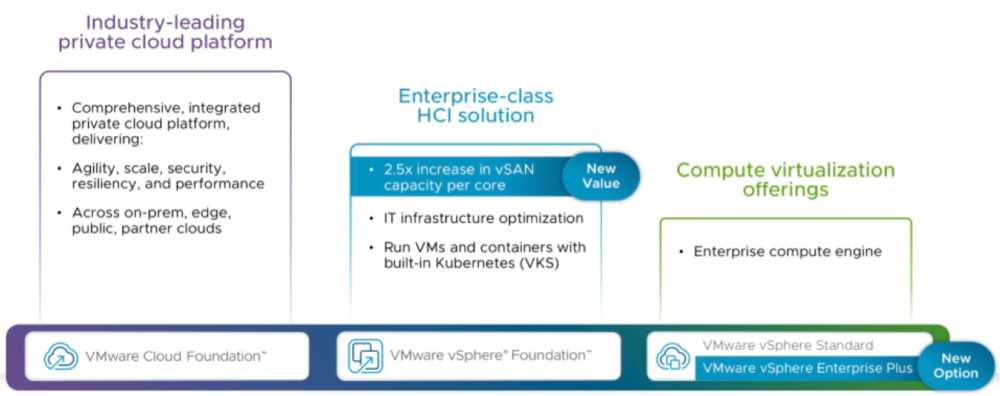
VMware’s offerings have been reduced from 168 products, bundles and editions, to just four (4) bundles. These four bundles are:
1) VMware Cloud Foundation (VCF)
2) vSphere Foundation (VVF)
3) vSphere Standard (VVS)
4) vSphere Enterprise Plus (VSEP): This product replaced vSphere Essentials Plus (VVEP) due to weak demand. It is a different product (explained below).
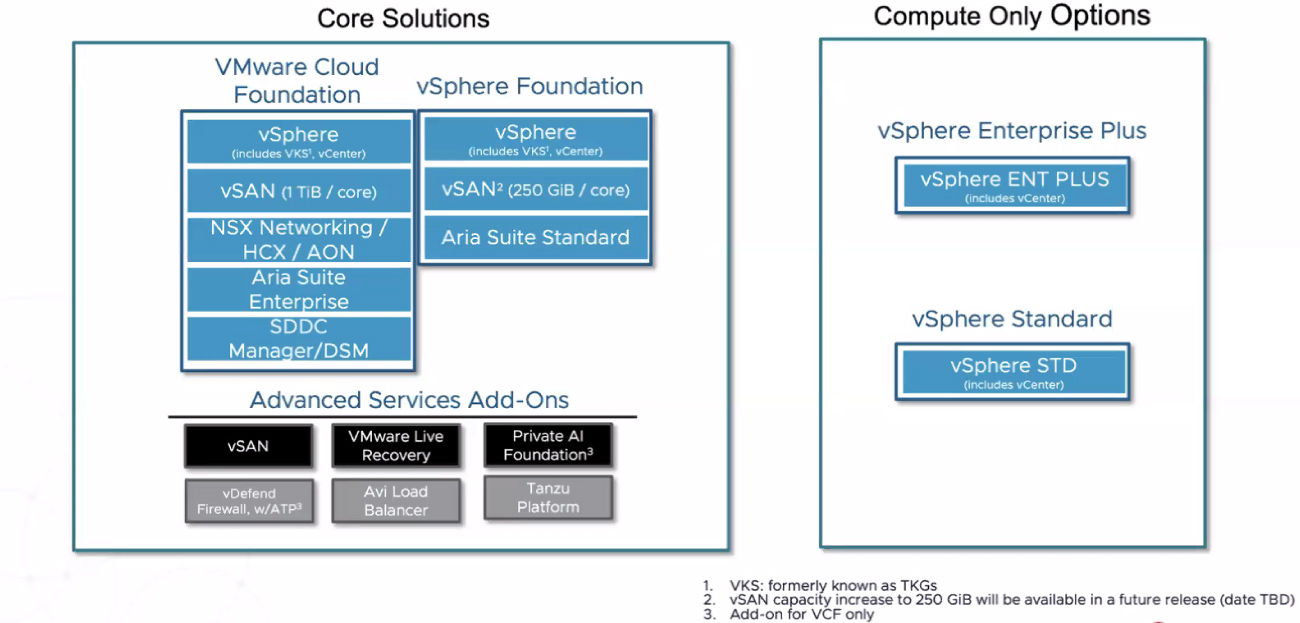
5) Advanced Services Add-ons: These include vSAN, VMware Live Recovery, Private AI Foundation, vDefend Firewall w/ATP, Avi Load Balancer, Tanzu Platform.
The below screenshot shows the new product portfolio of VMware:
VMware Cloud Foundation (VCF)
VMware Cloud Foundation (VCF) is a comprehensive software-defined infrastructure solution designed to provide a cloud operating model on-premises. It combines compute, storage, networking, and cloud management capabilities into a single integrated platform.
This is what the licensing looks like:
- Subscription-based model
- This package is “disconnected”, but there might be connectivity in future (Customers can mix perpetual and new offerings as long as they are “disconnected”)
- Pricing based on per-core usage
- Minimum requirement of 16 cores per CPU (Example: 4 CPUs with 4 cores each equals 64 cores)
- Flexible terms available: 1-, 3-, and 5-year options (supports annual billing and co-term)
- vSAN allocation: 1 Terabyte (TiB) per core
- Select Support: Premium global assistance featuring improved SLAs, senior VMware engineers, and Root Cause Analysis
vSphere Foundation (VVF)
VMware vSphere Foundation (VVF) is a tailored offering designed to optimize data center performance for organizations of all sizes. It is part of the VMware vSphere product line, which is a leading enterprise virtualization platform. It delivers predictive and proactive operations management, purpose-built to enable the best performance, availability, and efficiency from your infrastructure and applications.
The licensing looks like this:
- Subscription-based model
- This package is “disconnected”, but there might be connectivity in future (Customers can mix perpetual and new offerings as long as they are “disconnected”)
- Pricing based on per-core usage
- Minimum requirement of 16 cores per CPU
- Flexible terms available: 1-,
3-, and 5-yearoptions (supports annual billing and co-term) – now only available as a 1-year option - Includes Production Support
- Includes vCenter Standard
- Includes VMware Cloud Foundation Operations
- Includes VMware vSphere Kubernetes Service (VKS)
- Includes VMware vSAN Enterprise (250 GiB per core (increased from 100 GiB to 250 GiB as of November 2024)); requires 8.0U2B or newer
vSphere Standard (VVS)
VMware vSphere Standard (VVS) is a server virtualization solution that provides data center consolidation and enhanced application availability. It is designed for organizations that need industry-leading virtualization capabilities without the full suite of features and services offered in higher-end editions.
The licensing looks like this:
- Subscription-based model
- This package is “disconnected”, but there might be connectivity in future (Customers can mix perpetual and new offerings as long as they are “disconnected”)
- Pricing based on per-core usage
- Minimum requirement of 16 cores per CPU
- Flexible terms available: 1-,
3-, and 5-yearoptions (supports annual billing and co-term) – now only available as a 1-year option - Includes Production Support
- Includes vCenter Standard
vSphere Enterprise Plus (VSEP)
VMware vSphere Enterprise Plus (VSEP) is a comprehensive virtualization platform that includes advanced features such as vCenter Standard, Distributed Resource Scheduler (DRS), High Availability (HA), Fault Tolerance, and Storage vMotion, designed to optimize performance, availability, and efficiency for enterprise-level workloads.
The licensing looks like this:
- Subscription-based model
- This package is “disconnected”, but there might be connectivity in future (Customers can mix perpetual and new offerings as long as they are “disconnected”)
- Pricing based on per-core usage
- Minimum requirement of 16 cores per CPU
- Flexible terms available: 1-, 3-, and 5-year options (supports annual billing and co-term)
- Includes Production Support
- Includes vCenter Standard
FAQ
What happens when the subscription expires?
Updated 2024-12-26: There is no grace period at the expiration of the subscription. Customers must promptly renew their subscription to avoid a late renewal fee.
VMware has moved to subscriptions – do they require constant Internet connectivity?
No, the new subscriptions can run in offline (disconnected) environments. Broadcom terms these “disconnected” licenses, meaning no cloud activation check is required as long as your subscription is valid. In the future, some connectivity features might be introduced for convenience (e.g. VCF 9.0’s connected mode allows one-click license usage reporting), but customers can continue operating in air-gapped mode if needed. For compliance, VMware provides a method to periodically share offline usage reports (e.g. every 180 days) if you have no internet connectivity. Mixing perpetual and subscription licenses on the same systems is supported only if they remain in separate “disconnected” clusters
How will hosted IT services for non-“affiliated” companies be regulated in the future?
Regulations for these services remain unchanged and are governed by the General Terms, Software Exhibits, and Product Guide.
Regarding subsequent purchases: Can the rental licenses that may be purchased later and the perpetual licenses already available in the Enterprise Licensing Agreement (ELA) be used in parallel in the mix?
A mix of perpetual and subscription licenses is only possible in the vSphere area counted on a host-based basis. For vSAN, a mix of subscription and perpetual licenses is not possible.
Can I mix existing perpetual licenses with new subscription licenses in one environment?
Mixing is limited and mostly not recommended. You can run perpetual-licensed vSphere hosts alongside subscription-licensed hosts only if they are managed separately (for example, in separate clusters or vCenters, with no dependency). Within a single cluster or vCenter, having a mix of license types can be problematic or impossible. Specifically: for vSphere itself, it’s technically possible to have some hosts on perpetual and some on subscription, but all hosts participating in features like vMotion or HA clusters generally need a common licensing basis. For vSAN, mixing perpetual and subscription on the same cluster is not allowed at all – you would need to transition the entire vSAN cluster to subscription. In summary, it’s best to plan a full migration of a given environment to subscription licenses. During a phased upgrade, keep old and new licenses isolated to avoid compliance issues.
Can VMware Cloud Foundation (VCF) and vSphere Foundation (VVF) be mixed? What about global deployment rights?
Yes, but with caution. Technically, you could license some clusters with VCF and others with VVF under the same management, but within a single VMware Enterprise Agreement (VEO/ELA) it’s generally not allowed to mix them freely. VCF is intended as an all-in-one stack – if you have a VCF deployment, adding separate VVF-licensed clusters may complicate support or violate the bundle terms. Outside of an enterprise agreement, mixing is possible (for example, a company might use VCF in one data center and VVF in another). Global deployment rights (using licenses across regions or affiliates) will depend on your specific contract terms (General Terms and Product Guide) and may need negotiation for exceptions. Always verify with VMware/Broadcom if your use case involves combining different bundles.
To summarize: Outside of a VMware Enterprise Order (VEO) / Enterprise Licensing Agreement (ELA), mixing VMware Cloud Foundation (VCF) and vSphere Foundation (VVF) is possible. However, within a VEO, mix-and-match is not typically allowed.
What are the storage expansion options for VVF per Core 250GB vSAN storage?
The vSAN add-on can be used to expand storage, but licensing starts from scratch rather than just adding capacity.
VMware now licenses vSAN capacity on a per-TiB basis via an add-on subscription. If, for example, you have vSphere Foundation which includes 250 GiB per core and you need more, you must purchase a vSAN add-on subscription for the additional capacity. Notably, the vSAN add-on is licensed starting from 0 for the extra capacity – you can’t just purchase the “delta” above the included amount. In other words, to expand storage, you’d procure a vSAN subscription covering the total additional TiBs required. (For VCF, 1 TiB/core is included; any extra beyond that also uses the vSAN add-on.) This add-on approach applies only to vSAN storage – other add-ons cover different needs like backup (VMware Live Recovery) or security (vDefend firewall).
Is there anything known about the planned conversion of existing VMware Hybrid Purchasing Program (HPP) credits into subscription credits as part of a VMware ELA?
Details about the conversion from HPP credits to other credits are not yet available.
What happens to existing support contracts that were renewed for 2 years last year?
Existing support and subscription (SnS) contracts on perpetual licenses remain valid until their term ends. If you, for example, renewed support on vSphere 7 or 8 for two years in 2023, you will continue to receive support and updates for that period. Broadcom has honored existing support terms for legacy licenses. When those contracts approach expiration, you’ll likely need to move to the new subscription model (or renew via a subscription conversion). There are also extension options – VMware may allow extending support on certain perpetual products a bit longer, but generally the plan is to have customers transition to subscriptions at contract end. Always check the latest Product Lifecycle Matrix; core vSphere 7 support, for instance, ends by October 2025.
Can you provide pricing information for licensed editions? Where can I send price requests?
Pricing is obtained via VMware/Broadcom partners or representatives. VMware no longer publishes price lists publicly for these enterprise subscriptions. To get a quote, you should contact us (SCHNEIDER IT MANAGEMENT) or your VMware reseller. We can provide pricing for 1-year vs 3-year vs 5-year subscription options, and discuss any applicable discounts. In general, prices went up drastically, and Broadcom wants to push higher-tiered subscriptions, while giving discounts. However, deals are often individualized. Volume and commitment discounts may be negotiated, especially if you transition a large environment to subscription.
Are there still offers/discounts when handing over the perpetual licenses?
Yes, in many cases Broadcom/VMware are offering promotions or negotiated discounts for customers trading in perpetual licenses. There isn’t a universal public program, but account representatives can often provide custom transition discounts. For instance, some customers trading up to subscriptions have received credit for the remaining value of their perpetual support. Broadcom has also signaled a formal trade-in program is in the works, but details are still pending. The key is to negotiate individually – if you have sizable perpetual investments, work with your vendor (or us as your licensing partner) to get the best possible deal on the new subscriptions.
What exactly is license portability in VMware Cloud Foundation?
License Portability is a new benefit Broadcom introduced that lets you move your VMware Cloud Foundation subscriptions to supported clouds or service providers without buying new licenses. Essentially, a customer can use the same VCF licenses on-premises or “port” them to a public cloud (like running VCF on a hyperscaler) as their needs change. For example, Broadcom announced Google Cloud as the first supported hyperscaler for VCF license portability. This means you could deploy VMware Cloud Foundation on Google Cloud using your on-prem subscription entitlements. In the coming year, more clouds and VMware Cloud Provider partners will allow this. Portability gives flexibility to shift workloads to cloud while avoiding double licensing. (Note: This applies specifically to the VCF bundle; standard vSphere subscriptions are generally for on-prem use, whereas VMware has separate SaaS offerings for cloud.)
What are “global deployment rights” and are they affected by the new licensing?
Global deployment rights refer to the ability to use a license in multiple countries or by subsidiary companies. Under Broadcom, the licensing agreements (Enterprise License Agreements like VEO) often strictly tie licenses to the legal entity that purchased them, but customers can negotiate allowances. The general terms and product guide still govern this. Nothing in the new model inherently changed global rights – but if, for example, you have a corporate group spread across regions, you should ensure your enterprise agreement includes provisions for global use or affiliate use. Broadcom has been open to negotiating items like worldwide use and even acquisitions/minority-owned affiliates in large deals. It’s handled case-by-case as part of your contract. So, review your VMware agreements post-transition to ensure your usage in all locations is covered.
With vSAN now licensed per GiB/TiB, what changes if I had vSphere Enterprise Plus + vSAN Advanced (perpetual)?
In the old model, you might have had a CPU-based license for vSphere Enterprise Plus and another for vSAN Advanced. Now, moving to subscription: vSphere Enterprise Plus subscription covers the hypervisor features, but vSAN Advanced is replaced by a vSAN capacity subscription. You would license the total raw capacity of your vSAN cluster in TiB. VMware’s recommendation for those coming from Ent+ & vSAN Advanced is to move to vSphere Foundation, since it includes some vSAN capacity (0.25 TiB/core) out of the box. If that included amount (which scales with cores) is insufficient for your cluster size, you then add a vSAN add-on. The important thing is volume within a bundle is tied to that license – e.g. the 250 GiB/core included in VVF is tied to those cores and cannot be pooled across separate environments. So if you have multiple clusters, each cluster’s vSphere Foundation licenses bring their own vSAN capacity. To expand one cluster’s vSAN beyond included capacity, you buy add-on for that cluster. In summary, you must license the full vSAN capacity needed under the new model – any existing perpetual vSAN licenses won’t carry forward, so plan to subscribe for equivalent capacity.
Is there a replacement for Remote Office Branch Office (ROBO) licenses in the new model?
Not directly – there is no 1:1 ROBO edition in the new lineup. ROBO (which was a special low-cost package for remote sites with limited VMs) has effectively been phased out (it’s listed as End of Availability). In some cases, VMware suggests using vSphere Standard for those small sites, or if more features are needed, possibly the vSphere Standard Essential Plus Kit (if it were still available) or an Enterprise Plus, depending on the environment. Another angle is the VMware Cloud Foundation Edge initiative (optimized for edge use), but that might be overkill for a small ROBO. For now, if you had ROBO, you’ll likely transition to standard per-core licensing on those remote hosts – which could mean higher cost. Keep an eye out if VMware introduces a lighter tier for edge in the future, but as of 2025 nothing specific replaces ROBO licensing.
Is vSphere Essentials Kit or Essentials Plus still available for small businesses?
No, the Essentials Kits are no longer sold (post-2024). VMware retired the Essentials Plus Kit as part of the simplification. Initially, Broadcom allowed a new “Essentials Plus subscription” for a short time, but by late 2024 they decided to discontinue it due to limited demand (and to streamline offerings). This means small organizations that used the 3-host Essentials Plus kit must now choose vSphere Standard or Enterprise Plus subscriptions. Standard is the direct replacement if you only need basic HA/vMotion capabilities, while Enterprise Plus might be chosen if you need the advanced features that Essentials Plus had (like vSphere Replication, which Standard lacks). Be aware this change increases costs for small deployments, as the entry point is higher now without the heavily discounted Essentials bundle. VMware is essentially positioning vSphere Standard as the SMB offering going forward.
What’s the difference between “Select Support” and normal support?
Select Support (included with Cloud Foundation subscriptions) is a premium support tier Broadcom offers. It features enhanced SLAs (faster response times), direct engagement with senior VMware support engineers, and proactive Root Cause Analysis (RCA) for critical issues. It’s somewhat analogous to VMware’s former “Premier Support”. In contrast, Production Support (included with vSphere Foundation, Standard, Enterprise Plus) is the standard 24×7 support with defined response targets (e.g. 30 min for critical severity). Production Support is very capable for most needs, but Select Support can be valuable for mission-critical environments where you expect a higher touch service. The inclusion of Select Support with VCF underlines that it’s an enterprise-focused bundle. If you have VCF, leverage the Select Support channels provided for any major incident or complex issue.
Will VMware Horizon (Virtual Desktop Infrastructure) licensing change as well?
So far, no major changes have been announced for VMware Horizon licensing. The shake-up has mainly affected the data center/cloud infrastructure products (vSphere, vSAN, NSX, etc.). Horizon and related VDI products continue under their existing licensing models (which can be named-user or concurrent-user based, often sold as perpetual plus SnS or as term licenses). Broadcom could revamp Horizon in the future, but as of late 2025 there’s no new licensing schema for Horizon – it remains separate from the vSphere portfolio changes. If you have Horizon Enterprise or similar, you can continue to renew or buy those as before. Academic and special SKUs (e.g. for VDI in education) also remain in place for now. Keep an eye on VMware’s announcements, but expect any VDI licensing updates to be communicated well in advance. If you want, you can subscribe to our licensing newsletter to stay up-to-date on these changes.
Is there a possibility of a trade-in? Or is there any information about the prices that VMware charges?
While VMware has announced a trade-in program, details are yet to be communicated. Individual discounts are offered in current customer situations for transitioning to the subscription model.
What are the storage expansion options for VMware vSphere Foundation (VVF) per Core 250GB vSAN storage?
Additional TiB can be added using the vSAN add-on. However, with VVF, the add-on must be licensed “from 0,” and not just the delta.
What’s the latest on Dell VxRail now that VMware is with Broadcom?
VxRail (Dell’s VMware-based hyperconverged appliance) continues to be supported and sold, despite Dell ending its reseller agreement with VMware. In early 2024, Dell exercised a clause to terminate its exclusive reseller deal with VMware post-acquisition. This led to speculation about VxRail’s future. However, Dell and Broadcom have publicly reaffirmed their commitment to existing VxRail customers. The VxRail product line is still current – Dell remains a partner for VMware, and VxRail (which is essentially vSphere/vSAN/VCF on Dell hardware) is still offered. The main change is licensing: new VxRail purchases after April 2024 come with subscription licensing (no more perpetual options). Customers with existing VxRail systems and perpetual licenses are not forced to change; they’ll be supported through their support contracts. If those expire, renewal will likely be on subscription terms. Broadcom and Dell have a joint engineering collaboration for VxRail and VCF on VxRail, ensuring that the integrated experience remains smooth. In summary, VxRail is not discontinued – it’s evolving with the new licensing, but Dell and VMware are still working together to serve VxRail users. Continue to use your VxRail as normal, and engage Dell/VMware for any support or expansion – they have promised “business as usual” service for this platform.
Will there be a VMware vSphere 9.0 release, and how is it obtained under this new model?
VMware’s next major version of vSphere is indeed arriving as part of vSphere Foundation 9.0 (and Cloud Foundation 9.0). There is no standalone “vSphere 9” perpetual edition. All vSphere 9.x features are available only through the subscription bundles (VVF or VCF). In practice, this means if you have vSphere Standard or Enterprise Plus subscriptions, you’ll continue on version 8.x (with updates) for now. To get the new features and improvements of vSphere 9 (released mid-2025), you would deploy vSphere Foundation 9.0 or Cloud Foundation 9.0. VMware has aligned the versioning of VCF and vSphere together at 9.0, reflecting the unified release. Customers with perpetual vSphere 8 will not get access to a 9.0 upgrade – they would need to convert to a subscription. So plan accordingly if you’re looking forward to capabilities in vSphere/VCF 9 (like enhanced license management, NVMe-oF support, etc.). It’s a significant change: VMware is effectively treating vSphere 9 as part of the new subscription suite, not a separate product sale. For reference, as of 2025 vSphere 8 Update 3 is the last version available under Standard/Enterprise Plus as standalone editions. Anything beyond that lives in the subscription offerings.
Can license bundles such as vSphere Foundation (VVF) and vSphere Standard be combined? E.g.: There are two clusters in a vCenter – can one cluster be licensed with vSphere Foundation and the other cluster with vSphere Standard?
Yes, generally speaking, that’s possible. It may be mixed, but is absolutely not recommended, as the features of the Enterprise Plus and Standard licenses are different. Features such as Fault Tolerance (FT), Distributed Resource Scheduler (DRS), Distributed Power Management (DPM) only work between servers that have licensed the same features.
Will there be special pricing or editions for Education, Non-profits, or Academic institutions?
Currently, no – there are no new special conditions for Academic or Non-profit sectors beyond what previously existed. VMware’s portfolio simplification did not introduce separate academic versions of the new bundles. Educational institutions must transition to the same vSphere subscriptions. Any discounts would come from normal academic discount structures via channel partners. Broadcom has not (so far) announced tailored bundles or reduced functionality editions for education. Therefore, schools and universities will need to budget for the standard subscriptions (possibly using volume licensing agreements if available). It’s advisable to negotiate directly for academic discounts. The Education/Academic SKUs for older editions (like vSphere Academic) are effectively phased out with the move to VCF/VVF. We can help educational customers explore options, but expect to use the commercial bundles with an academic discount applied, rather than a separate product.
How are costs changing under the new model? Will our VMware licensing costs increase?
It depends on your situation, but many customers are seeing higher long-term costs. The move to subscription generally means you pay yearly for support and license, rather than owning a perpetual license and just paying support. Broadcom has also adjusted pricing – some reports indicated potential price increases of 10–30% for equivalent capabilities, and even higher over multiple years. On the other hand, the consolidation of bundles may provide more value (e.g., vSphere Foundation includes features that previously required multiple licenses). Broadcom’s official line is that pricing will reflect “value and innovation”, but it’s clear that small deployments are facing higher entry costs (due to Essentials+ removal and 16-core minimum). Larger enterprises might actually negotiate better discounts by consolidating spend. Our advice is to assess the 3- to 5-year TCO: in many cases, the new subscription could cost more over time than sticking with perpetual + SnS would have – in some scenarios, 100%+ cost increase over 5 years has been noted. Make sure to work with a licensing specialist to optimize your plan (for example, rightsizing core counts, dropping unneeded features, or exploring enterprise agreements to cap costs). You can contact our VMware specialists at SCHNEIDER IT MANAGEMENT for help.
Do we need to install new license keys when switching to subscriptions?
Yes. When you transition from a perpetual VMware license to a subscription, you will receive new license keys (or files) for the products. For instance, if you move from vSphere 7 Enterprise Plus (perpetual) to vSphere Enterprise Plus Subscription, you must enter the new subscription license key into vCenter. The old keys won’t cover new versions or the subscription term. In VMware Cloud Foundation 9.0, this process is even more streamlined: instead of many keys, you install a single license file that covers your whole environment. But either way, you do have to activate new licensing – it isn’t automatic. So plan a maintenance window to update license keys in vCenter/VCF after purchasing the subscriptions. The good news: If you are mid-term on SnS and converting early, VMware often provides a conversion program where your new keys start when the old support term ends (so you’re not double-paying). Coordinate the key swap carefully to avoid any lapse in license coverage.
VMware Cloud Foundation vs vSphere Foundation vs vSphere Standard vs vSphere Enterprise Plus
After consolidating the portfolio, VMware now essentially offers two paths for customers: VCF for a full private-cloud stack (with everything integrated) or vSphere Foundation for core virtualization + operations – with Standard/Enterprise Plus as smaller-scale options. This decisive simplification is aimed at reducing complexity and helping customers adopt a more straightforward licensing approach.
For a quick overview of how features compare across vSphere Standard, Enterprise Plus, vSphere Foundation, and Cloud Foundation, see the comparison table below:
| Feature / Capability | vSphere Standard | vSphere Enterprise Plus | vSphere Foundation | VMware Cloud Foundation |
|---|---|---|---|---|
| Hosts per Cluster (vSphere) | Unlimited | Unlimited | Unlimited | Unlimited |
| High Availability (HA) | ✅ Yes | ✅ Yes | ✅ Yes | ✅ Yes |
| vMotion (Live Migration) | ✅ Yes | ✅ Yes | ✅ Yes | ✅ Yes |
| Distributed Resource Scheduler (DRS) | ❌ No | ✅ Yes | ✅ Yes | ✅ Yes |
| Distributed vSwitch (Network) | ❌ No | ✅ Yes | ✅ Yes | ✅ Yes |
| Fault Tolerance (FT) | ⚠️ Limited* | ✅ Yes | ✅ Yes | ✅ Yes |
| Storage DRS / automated tiering | ❌ No | ✅ Yes | ✅ Yes | ✅ Yes |
| vSAN (Software-Defined Storage) | ❌ No | ❌ No (add-on only) | ✅ Yes (included) | ✅ Yes (included) |
| Included vSAN Capacity | – | – | 0.25 TiB/core | 1 TiB/core |
| Enhanced Security (Encryption, TPM) | ❌ No | ✅ Yes | ✅ Yes | ✅ Yes |
| Kubernetes Integration (Tanzu, VKS) | Limited | Limited | ✅ Yes (VKS included) | ✅ Yes (Full K8s suite) |
| Cloud Integration & Automation | Limited | Limited | ✅ Yes (Aria Ops) | ✅ Extensive (NSX, Aria suite) |
| Aria Operations (vRealize Ops) | ❌ No | ❌ No | ✅ Yes | ✅ Yes |
| Aria Automation (vRealize Automation) | ❌ No | ❌ No | ❌ No (add-on) | ✅ Yes (included) |
| NSX (Network Virtualization) | ❌ No | ❌ No | ❌ No | ✅ Yes (included) |
| Support for Hybrid Cloud | ⚫ Basic (via vCenter) | ⚫ Basic | ✅ Integrated | ✅ Deep integration |
| Licensing Model | Per-core (16 min) | Per-core (16 min) | Per-core (16 min) | Per-core (16 min) |
*Fault Tolerance in Standard supports limited vCPU (up to 2 vCPUs), whereas Enterprise Plus and above support FT for larger VMs.
As shown above, vSphere Standard (VVS) covers the essential virtualization features (HA, vMotion, etc.) but lacks advanced automation and built-in storage.
vSphere Enterprise Plus (VSEP) adds those advanced features like DRS, distributed networking, and enhanced security, but still requires additional licenses for vSAN or hybrid cloud functions.
vSphere Foundation (VVF) includes all Enterprise Plus features plus vSAN and Aria Operations for monitoring, making it a complete on-prem solution for most needs.
VMware Cloud Foundation (VCF) extends further with NSX and Aria Automation, delivering a full private cloud platform (compute, storage, network, management) with the highest level of integration (ideal for large enterprises and service providers).
In summary, smaller organizations typically choose between Standard and Enterprise Plus, whereas larger deployments gravitate to vSphere Foundation or the all-inclusive Cloud Foundation, depending on whether they need the NSX-based network virtualization and cloud-scale operations.
 Find a vSphere Product Line Comparison here: 2025-09-11 VMware Datasheet vSphere Product Line Comparison
Ready to save licensing costs on Broadcom VMware?
Contact our VMware licensing experts to get consultancy on how to save costs on VMware and receive an advantageous quote for your business case today.