

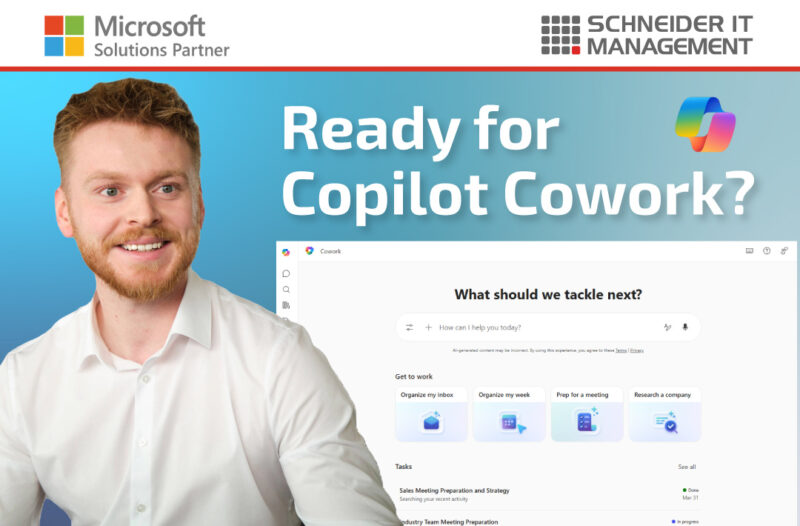
On May 5, 2026, Microsoft announced a new wave of capabilities for Copilot Cowork, the Anthropic-based agent in Microsoft 365 Copilot that can complete work on your behalf. Copilot Cowork is now reaching iOS and Android, gaining reusable Skills for repeatable workflows, and integrating natively with Dynamics 365, Fabric IQ with Power BI, and a growing list of third-party business systems. Copilot Cowork is available through the Microsoft Frontier program for Microsoft 365 Copilot users (if enabled by an admin).
Summary
- Copilot Cowork on iOS and Android lets users delegate work from a mobile device and come back to a completed result.
- Cowork Skills are reusable instruction sets that capture how a task should be done. Microsoft ships built-in Skills for common workflows, and organizations can build custom Skills.
- Native integrations now connect Cowork to Dynamics 365 (sales, customer service, ERP) and to Fabric IQ with Power BI so analytics and business data can be pulled directly into Cowork workflows.
- Third-party connectors for LSEG (London Stock Exchange Group), Miro, monday.com, and S&P Global Energy are available now, with more on the roadmap.
- Custom plugins let organizations extend Cowork to their own systems and processes.
From chat to execution: what Copilot Cowork is
Copilot Cowork is an activatable agent in Microsoft 365 Copilot that goes beyond answering questions. Where standard Copilot replies in chat, Cowork plans the work, executes it across your tools, and returns a completed outcome, for example, an organized inbox, a drafted report, a research brief, or a built web page.
Cowork is built on Work IQ, the intelligence layer that gives Copilot context about your data, your tools, and your organization. Because Cowork runs in the cloud, tasks continue even when your laptop is closed or your PC is offline.
To understand EU data regulation implications and to activate Copilot Cowork, read this article: https://www.schneider.im/microsoft-365-copilot-anthropic-models-and-compliance-impact-in-the-eu/.

Cowork on iOS and Android
A core part of Microsoft’s Copilot strategy is bringing AI into the flow of work on any device. With the new Cowork mobile experience on iOS and Android, users can:
- Delegate a task from a mobile device and come back to a finished outcome. This works, for example, on a commute, between meetings, or away from a desk, and syncs with your chats on your desktop and web.
- Hand off long-running work instead of waiting for it to finish on screen, because Cowork executes in the cloud.
- Keep one consistent Cowork experience across desktop, web, and mobile, with the same skills and integrations available on each surface.
Cowork Skills: reusable intelligence for repeatable work
Microsoft distinguishes between:
- Skills: A Skill is a reusable set of instructions that tells Cowork how to complete a specific task or workflow. This includes the structure, tone, and process you want it to follow. Skills turn one-off prompts into standardized, repeatable work.
- Connectors: Connectors link to external data sources and services that Cowork can use during conversations.
Microsoft is rolling out built-in Skills across Microsoft 365 for common workflows. These work out of the box once Cowork is enabled and require no authoring. They include:
- Creating documents in a consistent format and brand-adhering style.
- Coordinating meetings, including agenda preparation and follow-ups.
- Conducting research with structured outputs.
You can also create custom Skills. For example, you can create standardized customer briefs, recurring monthly reports, or structured incident write-ups. According to Microsoft, the author defines:
- the structure the output should follow (sections, length, format),
- the tone to use (formal, customer-facing, internal-only, technical),
- the process Cowork should follow (which sources to use, which checks to run, which steps to take and in what order).
To define a personal Skill, use this prompt: “I want to create a new personal skill. Guide me through defining the skill name, description, category, and instructions. Help me write a SKILL.md file and save it to my OneDrive skills folder.” (it doesn’t have to be this exact prompt).
Centrally managed custom Skills are not yet available.
Cowork plugins: connecting work across your business systems
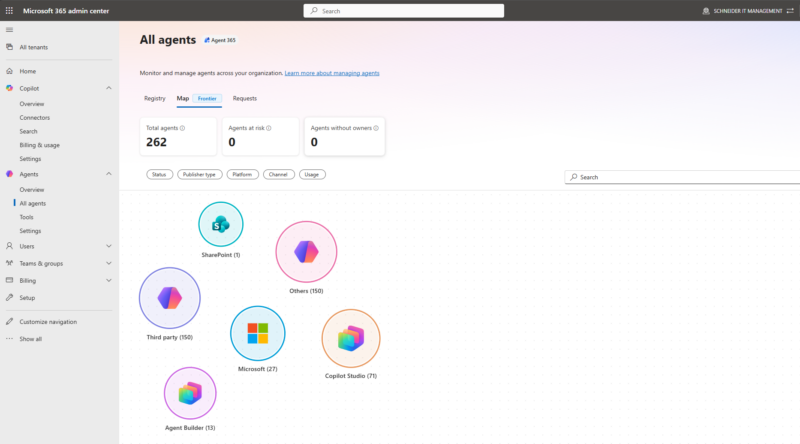
Cowork is also expanding its native integrations so it can operate across the systems your organization already runs on, not just Microsoft 365 content.
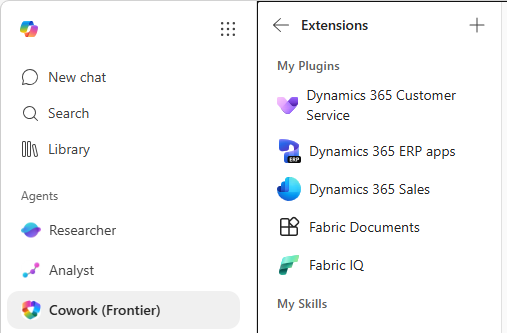
New native Microsoft integrations:
- Fabric IQ with Power BI: Brings analytics and modeled business data directly into Cowork workflows, so the assistant can reason over numbers from your data estate instead of just text in documents and emails.
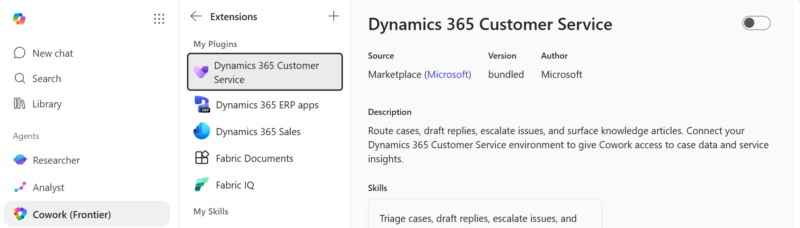
- Dynamics 365 (Sales, Customer Service, and ERP): Cowork can act on records inside your CRM and ERP without forcing users to context-switch into Dynamics. Examples:
- Preparing pipeline reviews from Sales,
- drafting case resolutions in Customer Service, or
- moving order approvals forward in ERP.
New third-party connectors available now:
- LSEG (London Stock Exchange Group)
- Miro
- monday.com
- S&P Global Energy
Microsoft has stated that more connectors will follow.
Licensing and availability
Cowork is delivered through the Microsoft Frontier program, Microsoft’s early-access track for organizations that already hold Microsoft 365 Copilot licenses and want to use new Copilot capabilities before general availability. It is still unclear when Cowork moves out of the Frontier Program and becomes broadly available.
How to activate Cowork
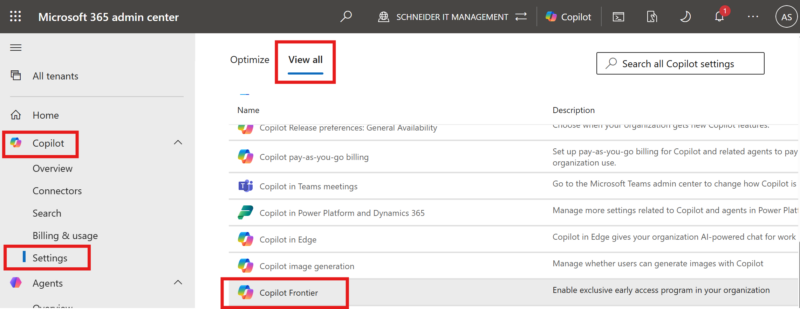
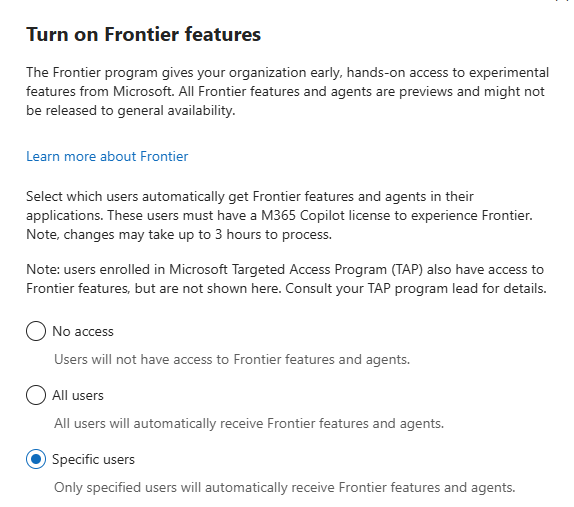
Admins can activate the Frontier Program (required for Copilot Cowork) for specific users in the Microsoft 365 admin center: https://admin.cloud.microsoft/#/copilot/settings/ViewAll/:/CopilotSettings/Frontier.
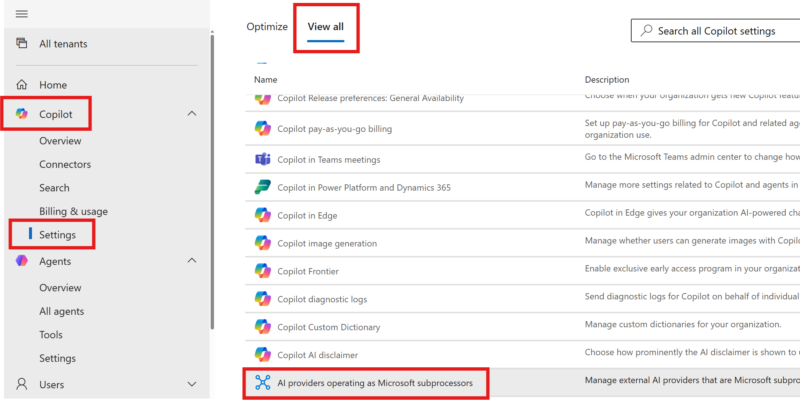
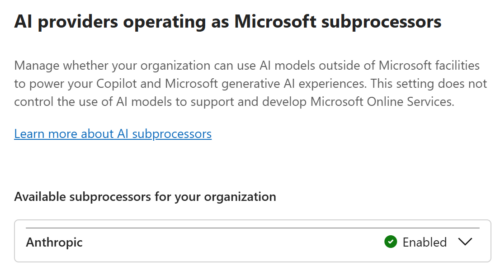
Note: For Cowork to be available, you first need to activate Anthropic as an AI provider: https://admin.cloud.microsoft/#/copilot/settings/ViewAll/:/CopilotSettings/Copilot3PModelSubProcessorSetting.
What to plan for now
- Join the Frontier program with specific test users to get hands-on access to Cowork and its new capabilities ahead of general availability.
- Identify the top three to five repeatable workflows in your organization that are good candidates for Cowork Skills (recurring reports, standard customer communications, structured research).
- Inventory the business systems that should be connected to Cowork via native integrations, ready-made connectors, or custom plugins. E.g.: Dynamics 365 modules, Power BI / Fabric assets, third-party SaaS.
- Align Cowork rollout with your Copilot governance model: Control data access, sensitivity labels, auditing, and Skill ownership in the Microsoft 365 admin center.
- Set a measurement baseline so you can compare productivity, throughput, and quality before and after Cowork adoption.

Sources
Copilot Cowork — from conversation to action (Microsoft 365 Blog): https://www.microsoft.com/en-us/microsoft-365/blog/2026/05/05/copilot-cowork-from-conversation-to-action-across-skills-integrations-and-devices/.
Microsoft Frontier program overview: https://aka.ms/frontierprogram.
Fabric IQ overview (Microsoft Learn): https://learn.microsoft.com/en-us/fabric/iq/overview.
Microsoft licensing information at SCHNEIDER IT MANAGEMENT: https://www.schneider.im/software/microsoft/.