

Effective April 15, 2026, Citrix will end support for its traditional file-based licensing system for all on-premises products. After this date, Citrix software will only recognize licenses managed through the new cloud-based License Activation Service (LAS). This means organizations using Citrix Virtual Apps and Desktops, NetScaler, XenServer, or other on-premises Citrix products must transition to LAS before the deadline to avoid any disruption.
A major upside is that Citrix is bringing back automatic license renewal (auto-renewal) via LAS, reducing the yearly hassle of manually updating license files. Below, we break down these important changes and what they mean for your organization.

Licensing Changes and the Move to LAS
Key updates starting now through April 2026 include:
- End-of-Life for File-Based License Files: Citrix’s old model of downloading and installing license files on a Citrix License Server (or directly on a NetScaler appliance) is being phased out completely. All new license files generated in the MyCitrix portal now carry an expiration date of April 15, 2026, and after that day any file-based licenses will cease to be valid. In other words, on April 15, 2026, products still using these files will stop recognizing them, resulting in loss of functionality for end-users. This hard cutoff applies globally, so every on-premises deployment needs to prepare.
- License Activation Service (LAS) Becomes Mandatory: The License Activation Service (LAS) is Citrix’s new cloud-hosted licensing system that will replace license files. Going forward, all on-premises Citrix products must be activated via LAS. To use LAS, you upgrade your Citrix License Server to a LAS-supported version (LAS was introduced with License Server v11.17.2 build 51000 or later) and register it with Citrix Cloud. Once connected, the license server (or standalone products like NetScaler) will sync license entitlements automatically over the internet. LAS checks in daily to keep licenses active, with a grace period of up to 30 days if connectivity is lost. After April 2026, LAS will be the exclusive method for activating licenses on supported Citrix on-prem products.
- Return of Auto-Renewal: In the legacy system, admins had to manually retrieve new license files every year or whenever they renewed or purchased more licenses – otherwise users could be locked out when a license file’s Subscription Advantage date passed. With LAS, Citrix is reintroducing automatic license renewals. The LAS platform is tied directly into Citrix’s backend entitlement systems, so when you renew your maintenance or subscription, the updated entitlements are automatically available to your license server. No manual action is required by the admin for renewals, which greatly reduces the risk of an expired license file causing downtime. In short, once you’re on LAS, keeping licenses up-to-date becomes a hands-off process, similar to how cloud services work.
- No Change in License Terms or Costs: Citrix emphasizes that this shift is purely a technology change and does not alter your contract terms or pricing. The types and quantities of licenses you own remain the same, just delivered via a new mechanism. If you have 500 Citrix Virtual Apps user licenses with active support, you will have 500 licenses in LAS – the only difference is how they’re activated. There are no new fees for LAS itself, and existing license agreements stay in effect.
- Updates to MyCitrix Portal: With file-based licensing going away, the MyCitrix self-service portal has been adjusted. All new license files created in MyCitrix now expire on April 15, 2026 (regardless of the term of the purchase). This ensures even newly generated files won’t work beyond the cutover date. Additionally, the option to re-download license files was removed from MyCitrix as of September 8, 2025. You can still view entitlements and manage user allocations in the portal, but you won’t be able to retrieve old-style license files indefinitely. These changes signal that now is the time to shift to LAS.
Before vs. After: How Licensing Works
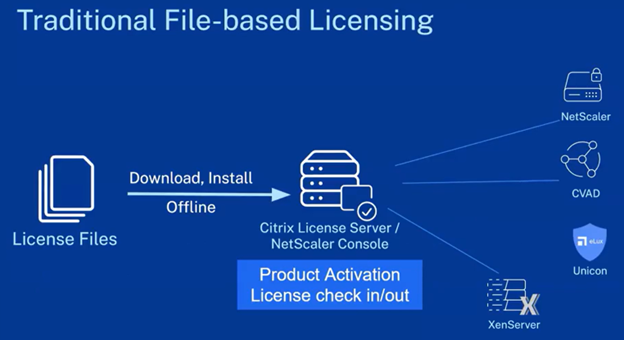
- Before (File-Based Licensing): Administrators received a .lic file from Citrix (via MyCitrix) for each product or license pack. This file was loaded onto a Citrix License Server (or uploaded to a NetScaler appliance), which then allowed Citrix products to run. Licenses had to be updated manually when support was renewed or new capacity was added.
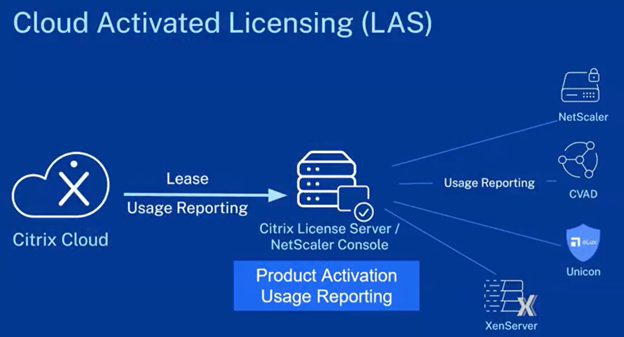
- After (LAS Cloud Licensing): Administrators register their License Server with Citrix Cloud and point Citrix products to it. The License Server then automatically retrieves license entitlements from Citrix’s cloud (LAS) and keeps them updated. No separate license files per product are needed. LAS manages all your activations centrally.
Impacted Products and Required Actions
Which Citrix products are affected? Essentially, any Citrix on-premises product that used the old license files will require LAS going forward. This includes:
- Citrix Virtual Apps and Desktops (CVAD): Formerly known as XenApp/XenDesktop, this is Citrix’s core solution for delivering virtual applications and desktops to users. It includes components like the Virtual Delivery Agent (VDA), Delivery Controller, and the Citrix License Server.
- Citrix Provisioning (PVS): Citrix Provisioning is used to stream operating systems to virtual or physical machines from a single shared disk image. It shares the same licensing infrastructure as CVAD.
- Citrix NetScaler: NetScaler is Citrix’s application delivery controller (ADC), often used for load balancing, VPN, and secure access. Licensing is typically applied directly on the appliance.
- Citrix Hypervisor (formerly XenServer): Citrix Hypervisor is a virtualization platform used to run virtual machines. Premium features are unlocked via license keys.
- Citrix (Universal) Platform License & other tools: This includes various infrastructure components that rely on license files, such as monitoring tools (e.g., Unicon Scout), management consoles, and hybrid cloud connectors.
Citrix Cloud services (DaaS, etc.) are not affected, since those are already managed by Citrix in the cloud. If you’re using only Citrix Cloud (fully hosted Virtual Apps, etc.), you don’t need to do anything.
Below is a summary of which product lines require a move to LAS:
Consequence of not transitioning
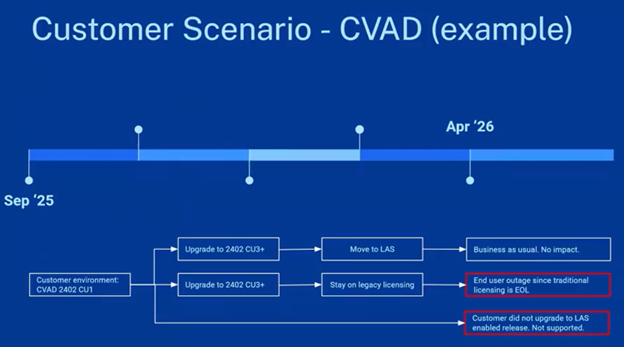
If you do not switch to LAS by April 15, 2026, Citrix products in your environment will stop recognizing their licenses. In practice, this means users may be unable to launch apps or desktops, NetScaler appliances will drop to limited functionality, and other services will cripple. Essentially, your Citrix infrastructure will treat it as if you have no valid licenses. This outcome could bring business operations to a halt, so it’s critical to plan ahead and not miss the deadline.
Timeline of the Transition
Citrix announced these changes well in advance to give customers time to adapt. Here’s a brief timeline from announcement to enforcement:
- September 8, 2025 – Announcement: Citrix publicly announces the EOL of file-based licensing. MyCitrix portal updates take effect the same day: new license files now show an expiration date of April 15, 2026, and the option to re-download existing license files is removed. Citrix releases FAQ guidance (Article ID CTX695107) and holds webinars to explain the change.
- Late 2025 – LAS Support Releases: Product updates enabling LAS become available. Admins are advised to start upgrading their Citrix License Servers and core products to LAS-compatible versions (e.g., apply the latest Citrix Virtual Apps and Desktops Long-Term Service Release (CVAD LTSR) cumulative update, update NetScaler firmware, etc.). Citrix Cloud account setup and license server registration can be tested in pilot environments.
- Q1 2026 – Migration in Progress: By early 2026, organizations should be actively transitioning to LAS. This quarter is the grace period to iron out any issues. Citrix and partners (like SCHNEIDER IT MANAGEMENT) are available to assist with migration. This is to ensure all entitlements appear correctly in LAS and that license check-ins are working for each product.
- April 15, 2026 – Enforcement Date: The final deadline: file-based licenses expire. Any remaining use of legacy license files now results in those Citrix products failing to obtain licenses. Going forward, only LAS-based activation works. Ideally, your environment is fully on LAS by this date and end users notice no difference.
What Should I Do Now?
For organizations running Citrix on-premises deployments, here are next steps to ensure a smooth transition:
- Plan Updates: Inventory your Citrix environment (versions of License Server, CVAD, NetScaler, etc.) and check against Citrix’s guidance for LAS support. Plan to upgrade components to the required versions well before April 2026. For example, schedule an update of the Citrix License Server to 11.17.2 (or newer), and update Delivery Controllers and VDA agents to latest maintenance releases that include LAS support.
- Enable LAS in a Test Run: Set up a Citrix Cloud account (if you don’t have one) using your organization’s MyCitrix credentials. Register a test License Server with LAS and point a subset of your Citrix infrastructure to it. This pilot will confirm that the license synchronization works and that your firewall permits the necessary outbound connection (HTTPS to Citrix Cloud). Citrix provides documentation and tools to monitor LAS connectivity. Resolve any issues during this dry run.
- Roll Out Organization-Wide: Once tested, migrate all production license servers to LAS. The process can often be done in place via an upgrade and registration. Your existing licenses will simply appear in LAS after the switch. Coordinate a maintenance window to flip your production systems to use the cloud activation (e.g., via Citrix Studio for CVAD or the license configuration on NetScaler). After migrating, monitor your systems over a few days to ensure users are not encountering licensing errors.
- Educate and Document: Make sure your IT staff and administrators are aware of the new licensing model. Update any internal documentation: for instance, procedures for adding new licenses (it might now involve just confirming they show up in LAS rather than uploading a file) and steps for annual renewals (which should now require no action, aside from verifying the renewed dates in Citrix Cloud). Also, inform security teams about the new Citrix Cloud connection requirement if this needs compliance review.
- Read through this FAQ: https://support.citrix.com/support-home/kbsearch/article?articleNumber=CTX695107.
- Get Help from Experts: Transitioning enterprise licensing systems can be challenging. If you need guidance specific to your environment, don’t hesitate to contact SCHNEIDER IT MANAGEMENT. As a Citrix partner, we can provide tailored advice and help execute the license migration smoothly. We’ll ensure you’re fully compliant with the new system and take advantage of the benefits it brings (like auto-renewal and easier license management). Feel free to reach out to discuss how these changes impact your particular setup and how to optimize your Citrix licensing strategy going forward.

Our Recommendation
Take action now. You will avoid last-minute scrambles and ensure a seamless switch to Citrix’s modern licensing. In return, you get a more streamlined system with less manual work and fewer surprises. That is a win-win for your IT team and your end-users.
If you have questions, contact SCHNEIDER IT MANAGEMENT.