

Act now to keep your Copilot workloads inside the EU: effective April 17, 2026, Microsoft enables Copilot Flex Routing by default for EU and EFTA tenants. This allows AI inferencing to occur outside the EU during peak demand periods, which might have compliance implications.
Summary
- Copilot Flex Routing is enabled by default for EU and European Free Trade Association (EFTA) tenants
- EU/EFTA tenants for large businesses, education or public sector customers might have the setting disabled by default; checking the settings is advised anyway
- Large language model (LLM) inferencing may occur outside the EU Data Boundary
- Limited pseudonymized Copilot data may be stored outside the EU or EFTA
- Routing controls are split across multiple Microsoft admin centers
- Immediate compliance, governance, and legal review is advised
What is Copilot Flex Routing and why did Microsoft introduce it?
The new feature “Copilot Flex Routing” allows Microsoft to process Copilot AI requests outside the EU Data Boundary during periods of high demand. This applies specifically to large language model (LLM) inferencing, which is the step where Copilot generates an answer to a user prompt.
The changes apply across Microsoft 365 Copilot, Copilot Chat, Power Platform Copilot, and Dynamics Copilot.
Microsoft introduced Flex Routing for capacity management reasons:
- AI workloads require significant GPU capacity
- EU data centers can reach capacity during peak usage
- Routing requests to non‑EU regions helps Microsoft avoid service degradation
Microsoft states that…:
- data remains encrypted in transit and at rest, and
- data at rest continues to be stored inside the EU.
The change still matters because it affects where AI processing happens, not just where data is stored. This distinction is critical for organizations with EU‑only processing requirements under regulatory, contractual, or internal governance rules.
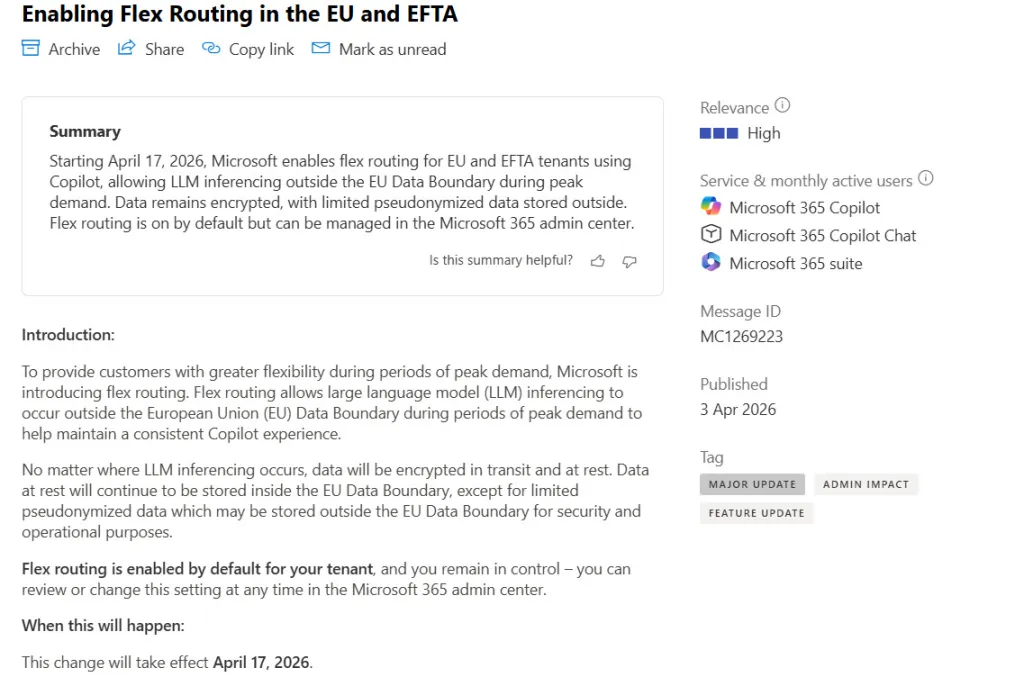
https://admin.cloud.microsoft/?#/MessageCenter/:/messages/MC1269223:
Does this affect all EU/EFTA Microsoft tenants?
Updated 2026-04-13: Microsoft stated in a Tweakers interview, that tenants of large commercial organizations, education customers, and organizations in the public sector might instead have an opt-in instead of the opt-out standard setting. That means, depending on how Microsoft classified your organization, the setting is on or off by default.
If this link leads you to a Microsoft Message Center message saying “Flex routing is turned off by default for your tenant. If you take no action, there is no change to how your data is processed […]”, then the option is turned off by default for your tenant: https://admin.cloud.microsoft/?#/MessageCenter/:/messages/MC1269219.

Anyway, we recommend checking, whether or not the setting is enabled in your tenant by following the instructions below.
Copilot Flex Routing: Default changes and silent rollouts
- Existent Tenants: As of April 17, 2026, Copilot Flex Routing is enabled by default for eligible EU and EFTA tenants.
- New Tenants: This also applies automatically to new tenants created after March 25, 2026.
With Flex Routing enabled:
- LLM inferencing may occur outside the EU Data Boundary, including in the United States, Canada, and Australia
- This applies even when all Microsoft 365 data at rest remains stored within the EU
- Customers should manually change the setting if EU‑only processing is required
This represents a significant change from prior default behavior, where Copilot workloads for EU tenants were processed only within the EU unless explicitly configured otherwise.
The rollout is silent by default. Compliance depends on proactive administrative action.
Copilot Flex Routing: “Limited pseudonymized data” may leave EU Data Boundary
Microsoft explicitly states that limited pseudonymized data may be stored outside the EU Data Boundary for security and operational purposes. No precise definition of “limited pseudonymized data” is provided beyond these general purposes.
Under the General Data Protection Regulation (GDPR):
- Pseudonymized data remains personal data
- GDPR obligations continue to apply, including purpose limitation and proportionality
- Transfers outside the EU may still require justification and documentation
These changes may introduce legal ambiguity. This is particularly the case where internal policies, customer contracts, or regulatory frameworks require EU‑only data processing. Data Processing Agreements (DPAs) may need review or updates to reflect this new default behavior.
Copilot Flex Routing: Governance spans multiple admin centers
Copilot Flex Routing is not governed from a single administrative surface, but from two admin centers.
Configuration exists in:
- The Microsoft 365 Admin Center, covering Microsoft 365 Copilot and Copilot Chat
- The Power Platform Admin Center, covering Power Platform Copilot, Dynamics Copilot, and Copilot Studio
Configure Microsoft 365 Admin Center first: the flex routing setting in the Power Platform admin center will honor the flex routing setting in the Microsoft 365 admin center unless the current setting in the Power Platform admin center is more restrictive.
From a compliance perspective, this creates a risk of incomplete governance if only one admin center is reviewed.
How to turn off Copilot Flex Routing in the Microsoft 365 Admin Center
This setting governs Microsoft 365 Copilot and Copilot Chat.
- Sign in to the Microsoft 365 Admin Center with an account that has the AI Administrator role
- Navigate to Copilot → Settings → Flexible inferencing during peak load periods
- Select Do not allow flex routing
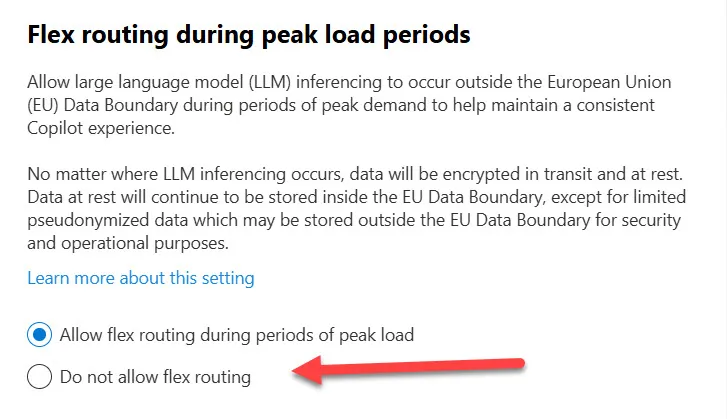
Once disabled, all Copilot LLM inferencing remains inside the EU Data Boundary, even during peak demand periods. Microsoft’s standard encryption, processing, and data residency commitments continue to apply.
How to turn off Copilot Flex Routing in the Power Platform Admin Center
Copilot experiences in Power Platform, Dynamics 365, and Copilot Studio are configured in the Power Platform Admin Center. This setting:
- Inherits the Microsoft 365 Admin Center configuration by default
- Can only be viewed and changed if Flex Routing is allowed at the Microsoft 365 level
- Must be reviewed separately for multi‑workload Copilot deployments
Why this matters now for EU organizations
These changes break the assumption that Microsoft Copilot defaults are conservative from an EU compliance perspective.
For regulated industries such as public sector, financial services, and healthcare, default off‑EU inferencing may conflict with:
- Sector‑specific regulations
- Internal data sovereignty commitments
- Procurement and contractual requirements
This is why it is necessary to keep up with Microsoft’s changes on a regular basis. Subscribe to our free licensing newsletter, if you aren’t already.
What organizations should do now
- Review the Flex Routing setting in the Microsoft 365 Admin Center now
- Check for inherited and overridden settings in the Power Platform Admin Center
- If you decide to keep this setting on:
- Assess whether off‑EU inferencing complies with internal policies and contracts
- Update DPAs if required
- Engage legal, compliance, and data protection stakeholders
- Communicate the change clearly to affected business owners and customers
Sources
Announcement/Learn article: https://learn.microsoft.com/en-us/microsoft-365/copilot/copilot-flex-routing
Info on countries, in which data may be stored with Flex Routing: https://learn.microsoft.com/en-us/privacy/eudb/eu-data-boundary-ongoing-partial-transfers#copilot-experiences-in-dynamics-365-power-platform-copilot-studio-and-microsoft-365.
EU Data Boundary documentation change log: https://learn.microsoft.com/en-us/privacy/eudb/change-log.
Microsoft 365 admin center – Copilot Settings: https://admin.cloud.microsoft/?#/copilot/settings/.
Power Platform admin center: https://admin.powerplatform.microsoft.com/environments.
Learn more about Microsoft enterprise licensing: https://www.schneider.im/software/microsoft/.