

Effective March 18, 2026, Microsoft introduced a new Azure Savings Plan for Databases. It enables organizations to reduce Azure database costs with a flexible, spend‑based pricing model.

Summary
- Microsoft launched a new spend-based savings plan for Azure database services
- Discounts apply automatically across eligible database workloads
- Coverage spans multiple services and regions without fixed resource commitments
- Available as a one-year term with monthly or upfront payment options
- Organizations should review database usage and baseline hourly spend
What is the Azure Savings Plan for Databases
The Azure Savings Plan for Databases is a spend-based pricing model for select Azure database services. Customers commit to a fixed hourly amount for one (1) year. In return, customers receive 0-35% lower prices compared to pay-as-you go pricing on select services.
It sits alongside other Azure optimization options, such as Azure Reservations and the Azure Savings Plan for Compute, but is designed specifically for dynamic, multi-database environments where workloads change over time.
How the Azure Savings Plan for Databases works
When you buy an Azure Savings Plan for Databases, you commit to a fixed hourly spend for one year (the three year option is not available for Azure Savings Plan for Databases) – for example, $100 per hour. This is a financial commitment and is not to be confused with a reservation of specific resources.
Every hour, Azure looks at your actual eligible database usage:
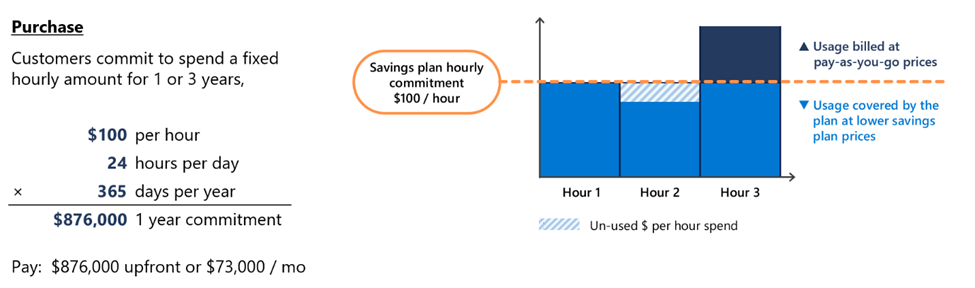
- Usage up to the hourly commitment is charged at the lower savings plan rates
- Usage above the commitment is charged at pay‑as‑you‑go prices
- If you use less than the committed amount in an hour, the unused portion does not roll over
Over a full year, a $100 per hour commitment equals $876,000, payable monthly or upfront. The benefit comes from consistently covering a predictable base load at discounted prices, while still allowing usage to grow or shift without constraints.
We recommend sizing the hourly commitment close to your stable baseline usage to maximize savings without over‑committing.
Azure Savings Plan for Databases: Covered services and discounts
The Azure Savings Plan for Databases applies to multiple Azure database services, with different discount levels depending on the service and pricing model.
| Service | Product | Savings for databases discount vs pay‑go pricing (1 year commitment) |
| Azure Database for PostgreSQL | Flexible Server (all generations) | 20% |
| Azure Database for MySQL | Flexible Server (all generations) | 20% |
| Azure Documents DB | N/A | 20% |
| Azure Cosmos DB | N/A | 12% |
| Azure SQL | Provisioned | 20% |
| Azure SQL | Serverless | 35% |
| Azure SQL | Hourly licenses | 20% |
| Azure DB Migration Service | N/A | 35% |
| SQL on Azure VMs | Hourly licenses | 0% |
| Arc-enabled SQL Server | Hourly licenses | 0% |
The 35% savings estimate is based on one Azure SQL Database serverless running for 12 months at a pay-as-you-go rate vs. a reduced rate for a 1-year savings plan. Based on Azure pricing as of March 2026. Prices are subject to change. Actual savings may vary based on location, database service, and/or usage. Note that savings plan for databases will also be consumed by SQL Server on Azure Virtual Machines and SQL Server enabled by Azure Arc hourly license at the normal pay-go price.
How to buy the Azure Savings Plan for Databases
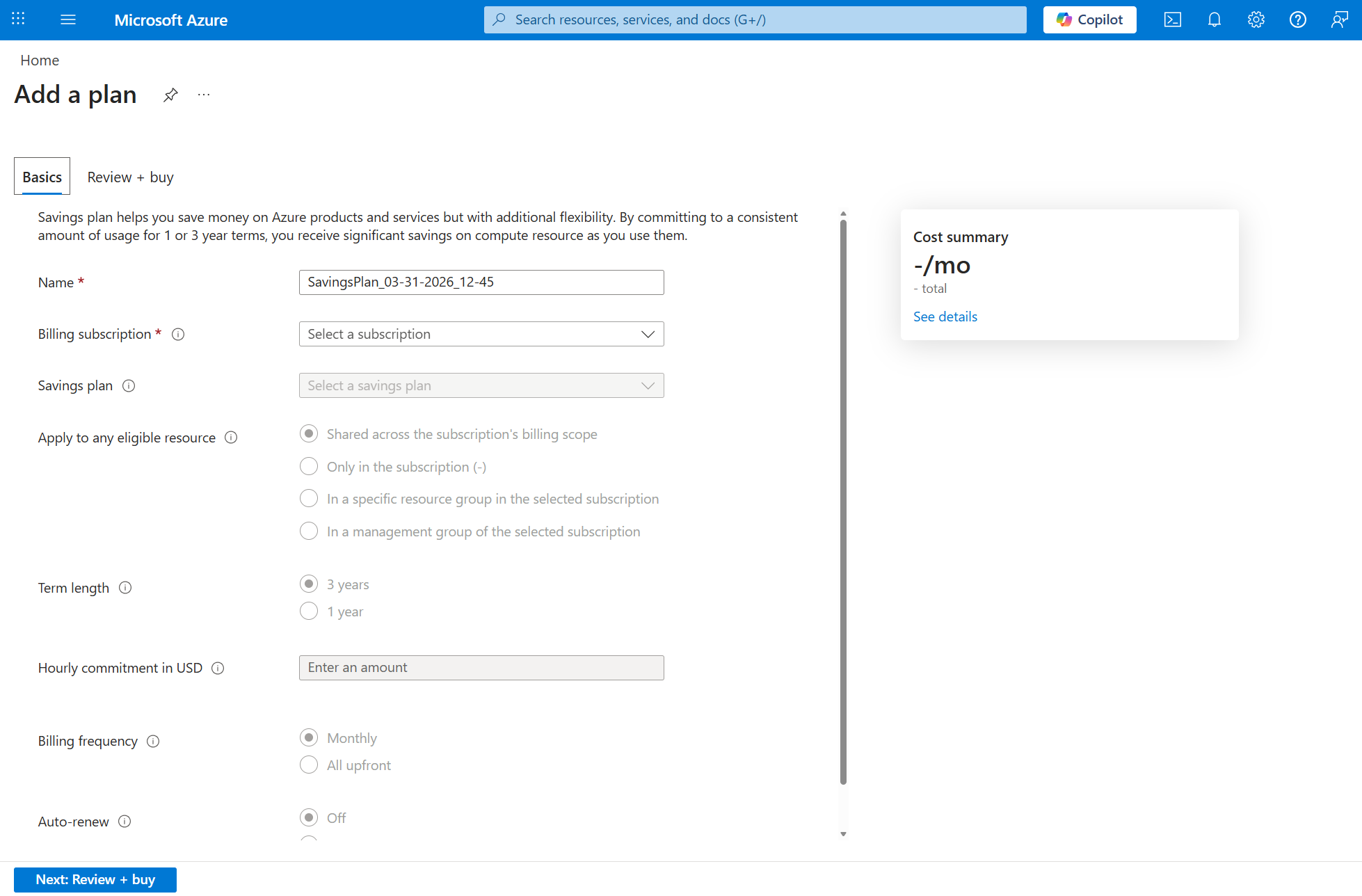
Purchasing the Azure Savings Plan for Databases is designed to be fast and usage‑driven and does not require upfront architectural decisions.
To find out what hourly rate to use, Azure Advisor analyzes recent database usage and provides personalized recommendations directly in the Azure portal. These recommendations help estimate an appropriate hourly commitment based on historical consumption.
You then:
- Pick an hourly commitment that matches your real consumption
- Decide the scope – one subscription or the full Azure account
- Choose monthly or upfront payment at the same price
- Enable auto‑renewal if you want continuous coverage
Once the plan is active, Azure automatically applies the savings every hour to eligible database usage. Discounts are applied dynamically without resource assignments or ongoing management. Usage above the commitment continues at pay-as-you-go rates.
Key benefits of the Azure Savings Plan for Databases
- Lower database costs without locking into fixed architectures
- Automatic optimization without manual reconfiguration
- Predictable spend for budgeting and forecasting
- Flexibility across services and regions

Why Microsoft introduced the Azure Savings Plan for Databases
Modern database environments are increasingly distributed, cloud‑native, and adaptive. Traditional reservation models can limit flexibility in these scenarios.
The Azure Savings Plan for Databases reduces financial risk, improves cost visibility, and increases control over cloud spend while supporting ongoing modernization. It aligns well with FinOps practices focused on continuous optimization rather than static commitments.
What the difference between the savings plan on compute vs. databases?
- Azure savings plan for compute applies to select compute services and is available in a 1 or 3 year term.
- Savings plan for databases applies to select database services and is available for a 1 year term.
- Note for Azure savings plan for compute, in addition, non-savings-plan eligible Azure services that are powered by savings plan-eligible VMs may also be covered by savings plan. For example, usage charges from virtual machines used by Azure solutions such as Azure Kubernetes Service (AKS), Azure Virtual Desktop (AVD) or Azure Databricks are also eligible for the Azure savings plan. For these services, please confirm that the solution’s underlying VM is listed as savings-plan eligible. This can be done via the Azure pricing pages.
Ready to optimize your Azure database licensing?

Assess how the Azure Savings Plan for Databases fits into your broader Azure cost optimization and licensing strategy with SCHNEIDER IT MANAGEMENT. Contact our experts now.
Sources
For the announcement of Microsoft Azure Savings Plan for Databases, please visit:
https://techcommunity.microsoft.com/blog/finopsblog/announcing-savings-plan-for-databases-flexible-savings-for-modern-evolving-workl/4503107.
Purchase a savings plan: https://aka.ms/purchasesavingsplan.
Azure Advisor: https://portal.azure.com/#view/Microsoft_Azure_Expert/AdvisorMenuBlade/~/Cost.
Understand how Azure savings plan is applied to a customer’s compute environment (video): https://www.youtube.com/watch?v=AZOyh1rl3kU.
For useful software licensing information on Microsoft products, please visit:
https://www.schneider.im/software/microsoft/.
Azure Cost Optimization Services: https://www.schneider.im/services/microsoft-azure-cost-optimization-services/.