

Keep your servers secure without the downtime of constant reboots. Effective May 15, 2026, Microsoft offers hotpatch enabled by Azure Arc at no additional cost for Windows Server 2025.
Summary
- Hotpatch enabled by Azure Arc is now available at no additional cost for Windows Server 2025
- Hotpatching delivers monthly security updates without a server restart
- Eligible machines must run Windows Server 2025 Standard or Datacenter and connect to Azure Arc
- Billing stopped for all enrolled machines as of May 15, 2026
- Already-enrolled machines need no action and continue to receive hotpatch updates
- Organizations can connect servers to Azure Arc to enable hotpatching across hybrid and multicloud environments
What is changing?
Microsoft removed the cost barrier for hotpatching outside of Microsoft Azure. Hotpatch enabled by Azure Arc is now free for Windows Server 2025 machines running on-premises or in multicloud environments. As of May 15, 2026, Microsoft stopped all billing for hotpatch on existing enrolled machines.
The change is commercial, not functional. The hotpatching service and its update mechanism stay the same. The same service is now included at no additional charge once a Windows Server 2025 machine connects to Azure Arc.
What is hotpatching?
Hotpatching is a Windows Server feature that installs monthly security updates without restarting the machine. Each hotpatch contains a full set of security fixes, equivalent to the standard update released the same day. On servers outside Azure, hotpatching is delivered through Azure Arc, Microsoft’s service for managing on-premises and multicloud machines from Azure.
Licensing note: Hotpatching is already a built-in capability of Windows Server Datacenter: Azure Edition – a separate, virtual-only edition that runs as an Azure Infrastructure as a Service (IaaS) virtual machine or on Azure Local. It has been included at no extra cost there since Windows Server 2022, for both Windows Server 2022 and Windows Server 2025.
The new announcement is different in scope: it extends no-cost hotpatching to Windows Server 2025 Standard and Datacenter machines running outside Azure – on-premises or in multicloud environments – once they connect to Azure Arc. The table below shows how the three scenarios compare.
| Scenario | Hotpatch cost |
| Azure Edition on Azure IaaS or Azure Local (Windows Server 2022 and 2025) | Included – unchanged |
| Windows Server 2025 Standard or Datacenter, Arc-connected, outside Azure (on-premises or multicloud) | Now free – the new change |
| Azure virtual machines using Azure Edition (Windows Server 2022 and 2025) | No fee – unchanged |
Customer benefits at a glance
- Less downtime, because most monthly updates apply without a reboot
- Faster protection, as security fixes take effect immediately
- Lower patching cost, now that the service carries no additional charge
- Fewer maintenance windows to schedule and coordinate
- Consistent patching across hybrid and multicloud servers from one place
Key capabilities
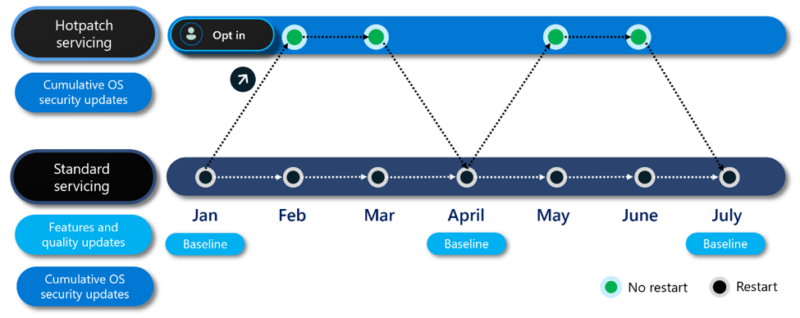
- Up to 8 hotpatch updates per year, delivered in a quarterly cycle with no restart
- Quarterly baseline updates in January, April, July, and October that require one restart
- Centralized orchestration through Azure Update Manager for at-scale rollouts
- Multiple enablement paths: Azure portal, Azure PowerShell, Azure Command-Line Interface (CLI), and the Representational State Transfer Application Programming Interface (REST API)
- Unified management of Windows, Linux, SQL Server, and Kubernetes through Azure Arc
Why hotpatching is relevant now
Unpatched servers are a primary security risk, and reboots create downtime that delays critical updates. Hotpatching reduces both: security fixes apply faster, and most months need no restart. Removing the cost barrier lowers the financial hurdle to standardized, timely patching. Centralized control through Azure Arc and Azure Update Manager increases visibility and compliance across hybrid estates. The result is a stronger security posture with less operational disruption.
What organizations should do now
- Review which servers run Windows Server 2025 Standard or Datacenter today
- Connect eligible machines to Azure Arc using the Azure Connected Machine agent, which takes a few minutes per server
- Validate that Virtualization-based security (VBS) is enabled before turning on hotpatch
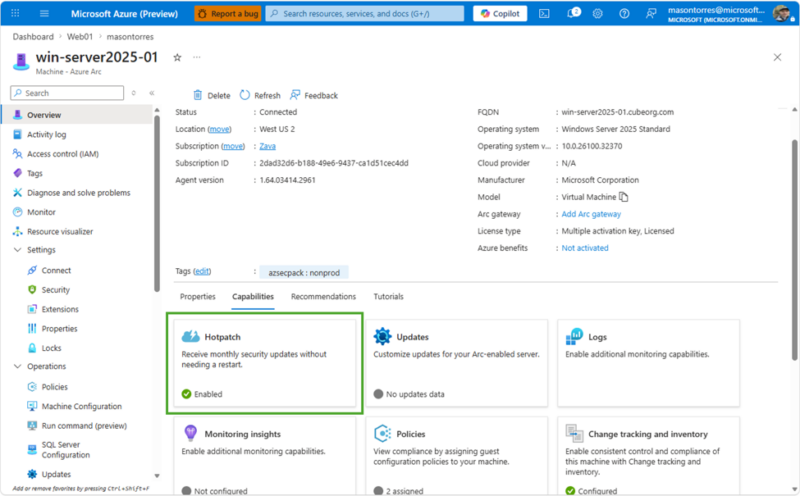
- Enable hotpatch from the Azure portal, PowerShell, CLI, or REST API
- Monitor rollouts at scale with Azure Update Manager
- Confirm that machines already enrolled need no action and stay enrolled automatically
Ready to optimize your Windows Server licensing?
Our Microsoft licensing experts help you assess Windows Server 2025 coverage, Software Assurance, Extended Security Updates (ESU), and Azure Arc readiness, so you capture this no-cost hotpatching benefit. Contact us today to align your Windows Server strategy.
Sources
For the announcement of Microsoft Hotpatching for Windows Server 2025, please visit: https://techcommunity.microsoft.com/blog/azurearcblog/simplified-access-to-hotpatching-enabled-by-azure-arc-for-windows-server-2025/4521251.
For useful software licensing information on Microsoft products, please visit: https://www.schneider.im/software/microsoft/.