

Reduce object storage costs automatically: effective April 14, 2026, smart tier for Azure Blob Storage and Azure Data Lake Storage is available.

Summary
- Smart tier for Azure Blob Storage and Azure Data Lake Storage continuously analyzes real access patterns and automatically moves data between the hot, cool, and cold tiers
- Frequently accessed data remains performant in hot, while inactive data is shifted to cheaper tiers and re-promoted automatically when accessed again
- No tier transition, early deletion, or data retrieval charges apply within smart tier; only standard tier pricing plus a monthly monitoring fee
- Smart tier targets large, growing data estates with unpredictable or evolving access patterns
What is smart tier?
On April 14, 2026, Microsoft confirmed the general availability of smart tier for Azure Blob Storage and Azure Data Lake Storage.
Smart tier is a fully managed, automated tiering capability and replaces the need for manual lifecycle rules on storage accounts. It continuously evaluates the last access time of each object on a smart tier-enabled storage account and moves the object to the most cost-effective capacity tier.
Once enabled, Azure evaluates each object’s last access time and automatically transitions data between three capacity tiers:
- Hot: for frequently accessed data. This is the fastest and most expensive to store and the cheapest to read.
- Cool: for data accessed only occasionally. This is cheaper to store and slightly more expensive to read.
- Cold: for rarely accessed data kept online for the long term. That is the cheapest to store and the most expensive to read.
During public preview, over 50 percent (%) of smart-tier-managed capacity shifted automatically to cooler tiers based on actual usage patterns, according to Microsoft.
How does smart tier work?
The default tiering schedule is:

- Newly created or written objects start in the hot tier
- After 30 days of inactivity, objects transition to the cool tier
- After an additional 60 days of inactivity (90 days total), objects transition to the cold tier
- On the next access, objects are immediately promoted back to hot and the cycle restarts
Read and write operations such as Get Blob and Put Blob reset the tiering cycle. Metadata operations such as Get Blob Properties, Get Blob Metadata, and Get Blob Tags do not count as access and do not influence tiering. All data remains on online tiers throughout the cycle, which preserves the standard availability, scale, and performance characteristics of Azure Blob Storage.
Licensing smart tier
Smart tier requires no separate SKU, add-on, or license purchase. It is a native Azure Storage capability activated through the storage account configuration and billed on consumption alongside your existing Azure subscription.
The commercial model has four components:
- Capacity charges apply at the standard rate of the underlying tier (hot, cool, or cold) where each object physically resides. There is no smart tier capacity meter.
- Monthly monitoring fee is charged per object larger than 128 KiB managed by smart tier. Objects of 128 KiB or smaller stay in hot and incur no monitoring fee.
- No tier transition, early deletion, or data retrieval charges apply within smart tier. Moving existing objects into smart tier is also free of tier-change fees.
- Exit costs apply when objects are moved out of smart tier with an explicitly assigned tier: one cool write transaction per object is charged.
Additional points to note:
- Access operations against smart tier objects are billed at hot tier transaction rates, including the initial promotion back to hot on access.
- Versions and snapshots are billed at full content length.
- Azure Storage reserved capacity can still be applied to reduce the underlying capacity rates for predictable, baseline workloads.

How to activate smart tier
Enabling smart tier for a new storage account
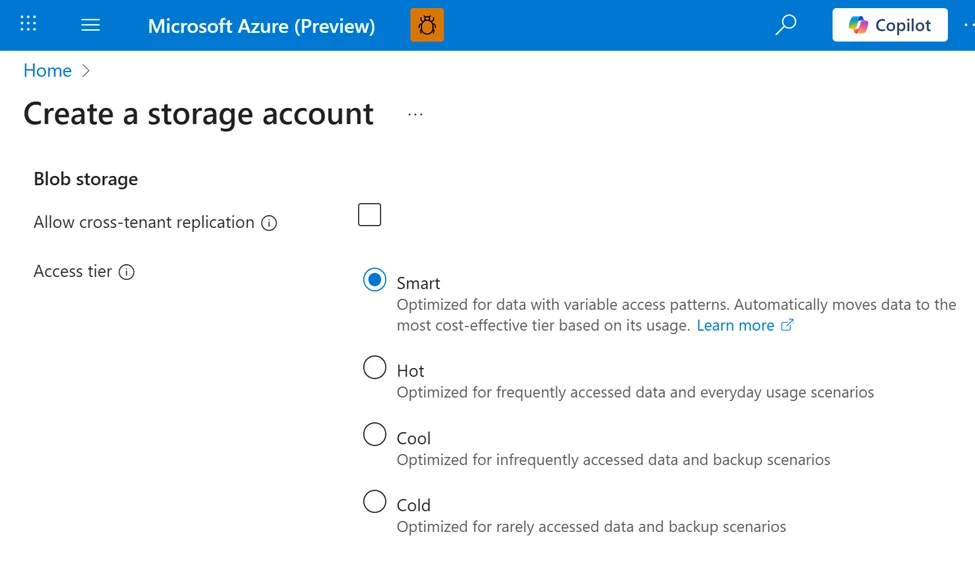
To set the default access tier to Smart for a storage account at create time in the Azure portal, follow these steps:
- Navigate to the Storage accounts page, and select the Create button.
- Fill out the Basics tab.
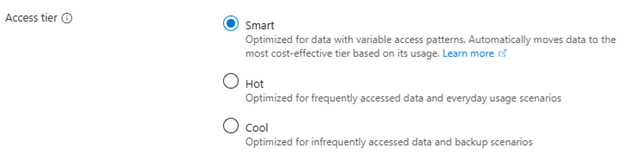
- On the Advanced tab, under Blob storage, set the Access tier to Smart.
- Select Review + Create to validate your settings and create your storage account.
Enabling smart tier for an existing storage account
To update the default access tier to Smart for an existing storage account in the Azure portal, follow these steps:
- Navigate to the storage account in the Azure portal.
- Under Settings, select Configuration.
- Locate the Blob access tier (default) setting, and select Smart. The default setting is Hot, if you have not previously set this property.
- Save your changes.
Why use smart tier
- Lower storage costs by placing data where it actually belongs across hot, cool, and cold
- No more lifecycle rules to design, tune, or maintain
- Predictable billing with no tier transition, early deletion, or retrieval fees
- Performance stays intact as active data stays hot and accessed data is promoted back instantly
- Continuous last-access evaluation with automatic moves between hot, cool, and cold
- Small objects (128 KiB or smaller) stay in hot with no tiering and no monitoring fee
- Pinning supported so objects with an explicit tier are excluded from smart tier management
- Built-in metrics in the Azure portal: SmartHot, SmartCool, SmartCold, SmartHot-small
- Feedback channel: smartblob@microsoft.com
Eligibility and prerequisites
Smart tier requires the following storage account configuration:
- Standard general-purpose v2 (GPv2) storage account
- Zone-redundant storage (ZRS, GZRS, or RA-GZRS)
- Block blobs only (page blobs and append blobs are not supported)
- REST API version 2025-08-01 or higher for programmatic access
Smart tier is not supported on legacy Standard general-purpose v1 (GPv1) or premium storage accounts. Smart tier is generally available in nearly all zonal public cloud regions. The regions Israel Central, Qatar Central, and UAE North, along with Azure Government and Microsoft Azure operated by 21Vianet (Azure in China), remain in Public Preview at this time.
What you can do now
- Identify Azure storage accounts that hold large or fast-growing object data with unpredictable access patterns
- Validate that your target accounts meet the prerequisites: Standard GPv2 with zone-redundant storage (ZRS, GZRS, or RA-GZRS) on block blobs
- Enable smart tier as the default access tier on new or existing supported storage accounts via the Azure portal, PowerShell, or Azure CLI
- Monitor tier distribution using the built-in SmartHot, SmartCool, SmartCold, and SmartHot-small metrics in the Azure portal
Ready to accelerate your business with Azure?

Optimize your Azure licensing and pricing with the help of our experts. Contact us today to get started.
Sources
For the announcement of Azure Storage smart tier general availability, please visit: https://azure.microsoft.com/en-us/blog/optimize-object-storage-costs-automatically-with-smart-tier-now-generally-available/.
For the official Microsoft Learn documentation on smart tier, please visit: https://learn.microsoft.com/en-us/azure/storage/blobs/access-tiers-smart.
For complete, region-specific pricing, refer to the official Azure Blob Storage pricing page: https://azure.microsoft.com/pricing/details/storage/blobs/.
For useful software licensing information on Microsoft products, please visit: https://www.schneider.im/software/microsoft/.