

Stay secure and compliant while you plan your database move.
Effective July 14, 2026, Microsoft ends support for SQL Server 2016.

Summary
- Microsoft ends extended support for SQL Server 2016 on July 14, 2026.
- Extended Security Updates (ESU) deliver critical security patches only, for a maximum of three years.
- Coverage runs through July 17, 2029, across three annual terms you buy separately.
- ESU pricing is now consistent across Azure, on-premises, and other clouds.
- Only Enterprise and Standard editions on the latest Service Pack qualify for ESUs.
- Act now: inventory every instance and choose upgrade, migrate, or ESU before July 2026.
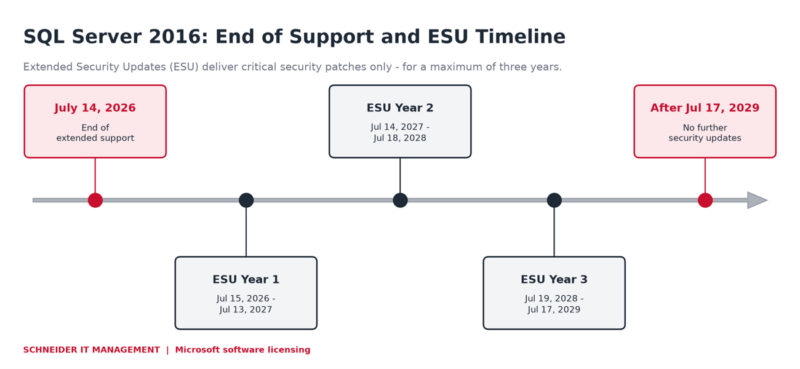
SQL Server 2016 support and Extended Security Updates timeline.
What is changing?
SQL Server 2016 reaches the end of its support lifecycle. After July 14, 2026, Microsoft stops shipping security updates and bug fixes for every edition. Extended Security Updates (ESU) are the bridge: they deliver critical security patches for up to three years while you modernize.
Microsoft has also aligned ESU pricing. ESUs purchased for Azure now cost the same as on-premises and other clouds – one consistent model at 100 percent of the 2025 license cost per year. This consistency applies to the ESU list price, which is now identical across Azure, on-premises, and other clouds, and across purchasing channels – including Enterprise Agreement, the Microsoft Customer Agreement, and the Cloud Solution Provider (CSP) program. Existing ESUs for SQL Server 2014 and Windows Server 2012 are not affected. SQL Server 2016 ESU billing begins July 15, 2026.
What are Extended Security Updates?
Extended Security Updates (ESU) are an offering for products that have passed their end of support. They deliver Security Updates rated Critical by the Microsoft Security Response Center (MSRC) – and nothing else. There are no new features and no non-security fixes, and technical support is limited to the released updates.
Within the Microsoft ecosystem, ESUs sit alongside Software Assurance (SA) and Azure -. For SQL Server 2016, they cover Enterprise and Standard editions and are licensed by virtual cores (v-cores) or physical cores (p-cores).
Customer benefits at a glance
- Keep regulated workloads updated against newly discovered critical threats.
- Hold your audit and compliance posture under frameworks that require current updates.
- Buy time for a planned migration.
- Pay only for the coverage you use when you subscribe through Azure Arc.
- Stop paying immediately once you upgrade or migrate to a supported platform.
Key capabilities
- Critical Security Updates delivered if and when available, on the latest Service Pack.
- Three enrollment paths: Azure pay-as-you-go, an Azure Arc subscription, or volume licensing with Software Assurance.
- Licensing by v-cores (4-core minimum per virtual machine) or by p-cores for host-level and unlimited virtualization.
- Automatic installation on Azure Arc-connected instances that have automatic updates enabled.
- Coverage that continues on Azure SQL after migration, with ESU charges stopping automatically.
How to enroll
You can subscribe to SQL Server 2016 ESUs through four routes. The right one depends on where the workload runs and whether your licenses carry active Software Assurance (SA).
| Enrollment path | How it works | Software Assurance |
| Azure VMs / Azure SQL | ESUs charged through your Azure subscription when SQL Server 2016 runs on Azure. | Not required (pay-as-you-go) |
| Azure Arc subscription | Connect on-premises servers with Azure Arc and subscribe; pay monthly for what you use. | Optional (pay-as-you-go or bring your own license) |
| Volume licensing with SA | Buy annual ESUs under Enterprise Agreement (EA), Enterprise Subscription Agreement (EAS), Server and Cloud Enrollment (SCE), or Enrollment for Education Solutions (EES) with active Software Assurance. | Required |
| Cloud Solution Provider (CSP) | Purchase SQL Server 2016 ESUs through a CSP partner in Partner Center, either as an Azure Arc subscription or as annual volume-licensing SKUs. | Required for VL SKUs; not required via Azure Arc pay-as-you-go |
Subscribing through Azure Arc: connect the server, open the SQL Server Configuration pane, and turn on the Extended Security Updates subscription.
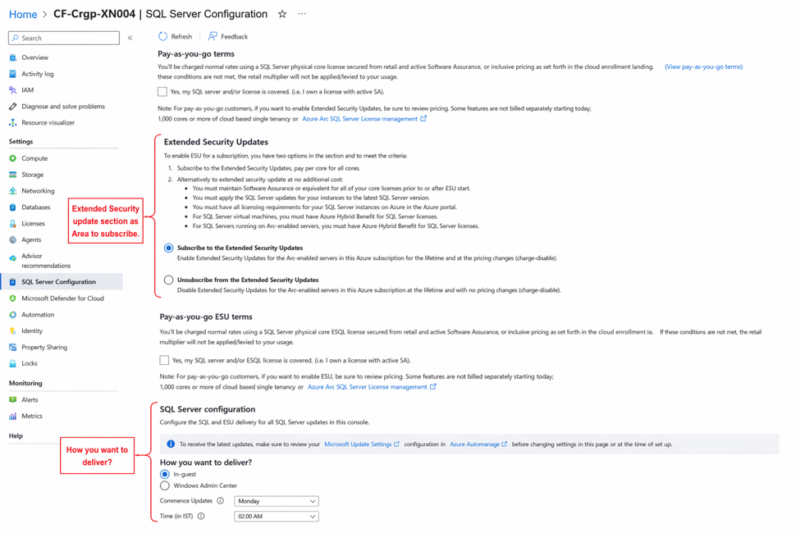
Subscribing to Extended Security Updates in the Azure portal (Azure Arc, SQL Server Configuration).
Why this is relevant now
Support ends July 14, 2026. Running an unsupported database raises security risk. Acting early gives you control over budget and avoids a rushed migration.
Windows Server 2016 follows the same end-of-support pattern. To coordinate both moves, see our guidance on preparing for Windows and Windows Server 2016 end of support.
What organizations should do now
- Review every SQL Server 2016 instance, edition, and core count across production, test, and development.
- Validate that each instance runs the latest Service Pack, because ESUs apply only on the current Service Pack.
- Identify which workloads can upgrade to SQL Server 2022 or 2025, migrate to Azure SQL, or need ESUs.
- Compare the three enrollment paths and confirm whether your licenses carry active Software Assurance.
- Update your fiscal-year budget for ESU costs.
- Monitor renewal dates and plan migrations to stop ESU charges as early as possible.

Ready to optimize your SQL Server 2016 licensing?
Our Microsoft licensing experts help you compare upgrade, migration, and ESU costs, confirm your Software Assurance coverage, and choose the best enrollment path. Contact us to plan your SQL Server 2016 licensing strategy with confidence.
Sources
For the announcement of Microsoft SQL Server 2016 Extended Security Updates, please visit: https://techcommunity.microsoft.com/blog/sqlserver/sql-server-2016-extended-security-updates-stay-protected-while-you-modernize/4529478.
For useful software licensing information on Microsoft products, please visit: https://www.schneider.im/software/microsoft/.