

Keep your on-premises Business Central environment running without interruption by renewing license keys on time.
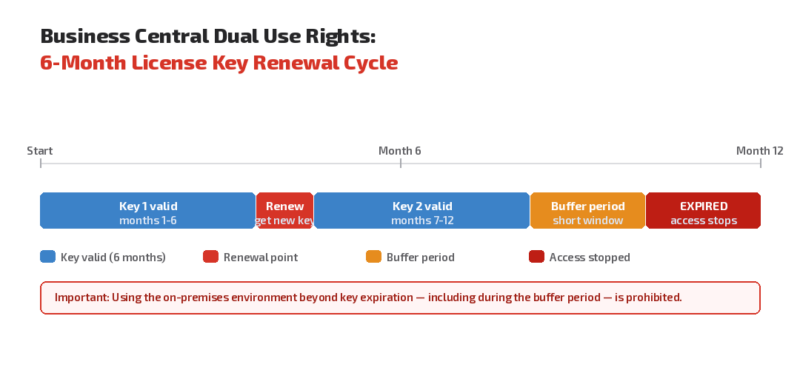
Effective June 5, 2026, Microsoft requires Dual Use Rights (DUR) license keys for on-premises Business Central deployments to be downloaded and replaced every six months.

Summary
- DUR license keys for Business Central on-premises now expire every six months
- Keys are tied to your subscription term plus a short buffer period
- Using the on-premises environment beyond key expiration – including during the buffer period – is prohibited
- New and replacement keys are available in the Microsoft 365 Admin Center
- Your Business Central online subscription must stay active – on-premises access depends directly on it
- Immediate action required: check whether DUR applies to your environment and start renewal tracking now
What is changing?
Previously, Dual Use Rights (DUR) license keys had more flexible validity periods. Under the updated policy, each key is valid only for the duration of your active Business Central online subscription term – plus a short buffer period.
Once the key expires, your on-premises environment stops functioning. Microsoft explicitly states that use of the DUR license beyond subscription expiration – even during the buffer period – is prohibited. This is a hard technical enforcement, not a soft limit.
What is Dynamics 365 Business Central Dual Use Rights?
Dynamics 365 Business Central is Microsoft’s cloud-based enterprise resource planning (ERP) solution for small and mid-sized organizations, covering finance, operations, sales, and service.
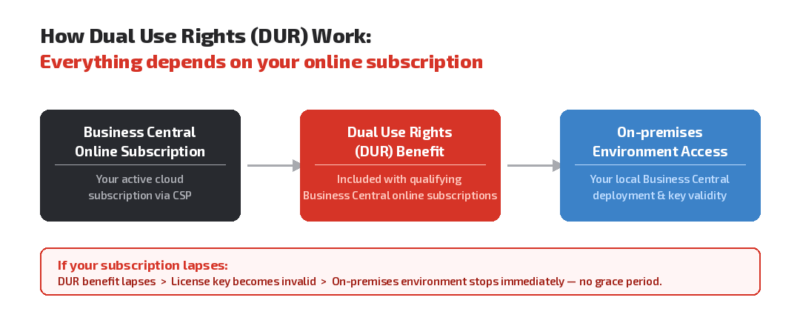
Dual Use Rights (DUR) is a licensing benefit included with certain Business Central online subscriptions. It allows you to also run Business Central on-premises – for example, for offline access, custom hardware integrations, or specific data residency requirements. DUR is not a standalone license; it is directly tied to your active Business Central online subscription. If your subscription lapses, your on-premises access lapses with it.
Benefits at a glance
- Clearer compliance boundary: your on-premises usage is directly linked to your active subscription status
- Reduced audit risk: automatic alignment between your cloud subscription and on-premises key validity
- Predictable renewal cycle: the six-month cadence creates a defined operational routine
- No gray zones: expired subscriptions can no longer unintentionally extend on-premises access
Why this change matters for your organization
If your organization runs Business Central on-premises under DUR, you now face a hard enforcement change – not just a policy update. Expired keys stop your on-premises environment immediately, with no grace beyond the buffer period.
This makes key renewal a critical operational task, not a background item. Missed renewals cause direct service disruption for any business processes dependent on your on-premises deployment.
If your organization runs Business Central on-premises primarily for legacy reasons, this is also a good moment to evaluate whether a full cloud migration would eliminate the key management requirement entirely.
What your organization should do now
- Confirm whether your Business Central subscription includes Dual Use Rights and whether you are actively using the on-premises component
- Download your current DUR license key from the Microsoft 365 Admin Center: Billing > Your products
- Record your key expiration date and set reminders 30 and 7 days before each renewal
- Assign a responsible person in your IT team to own the renewal process going forward
- Ensure your subscription stays active – a lapsed subscription immediately invalidates your on-premises access
- Speak with your licensing advisor if you are unsure whether DUR applies to your environment or when your next renewal is due

Ready to review your Dynamics 365 Business Central licensing?
Our experts help you assess the impact of the DUR enforcement change and review your Business Central subscription and licensing structure. Contact us to make sure your Business Central environment stays compliant and uninterrupted.
Sources
For the announcement of Microsoft Dynamics 365 Business Central Dual Use Rights license keys update, please visit: https://learn.microsoft.com/en-us/partner-center/announcements/2026-june#dynamics-365-business-central-dual-use-rights-license-keys-update.
For useful software licensing information on Microsoft products, please visit: https://www.schneider.im/software/microsoft/.