

Close your security gap as artificial intelligence accelerates every new threat.
Effective June 25, 2026, Broadcom is urging customers to fast-track their upgrade to VCF/VVF 9.1.
Summary
- Broadcom urges all customers to upgrade to VCF/VVF 9.1 as soon as possible.
- Broadcom research shows the time to exploit a new vulnerability has dropped from weeks to hours.
- VMware Cloud Foundation (VCF) and VMware vSphere Foundation (VVF) 9.1 deliver the newest security, resilience, and compliance capabilities, including live patching.
- Older releases – vSphere 8.x, VCF/VVF 5.x, and VCF/VVF 9.0 – keep scheduled patches but lack the newest protections.
- VCF Operations must be deployed first: it is mandatory in version 9 and included in your VCF and VVF subscription.
- New Upgrade Planner and Upgrade Assist tools streamline the move from older environments.
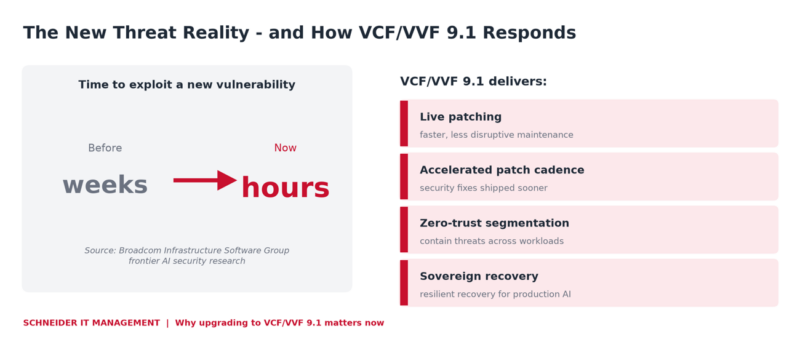
Why the upgrade is urgent – and what VCF/VVF 9.1 delivers in response.
What is changing?
Broadcom introduced VMware Cloud Foundation (VCF) 9.1 on May 5, 2026, and on June 25, 2026 began a global campaign urging customers to upgrade. The driver is security. Testing of frontier artificial intelligence security models against production code shows that adversaries now exploit new vulnerabilities in hours, not weeks. That pace is the new baseline for infrastructure security.
VCF/VVF 9.1 carries the most current security posture – not only vulnerability fixes, but foundational improvements such as live patching that make ongoing maintenance faster and less disruptive at scale. Broadcom will keep patching vSphere 8.x, VCF/VVF 5.x, and VCF/VVF 9.0 on their existing schedules, but those releases do not include the newest protections.
What are VCF and VVF?
VMware Cloud Foundation (VCF) is Broadcom’s integrated private-cloud platform that combines compute, storage, networking, and management. VMware vSphere Foundation (VVF) is the vSphere-centric bundle for data-center virtualization. Both are subscription-based and licensed per core.
Since version 9, both are operated and licensed through a VCF Operations instance and the VMware Cloud Foundation Business Services console. Subscription license files replace the former 25-character license keys, which makes VCF Operations central to how you run and license the platform.
Customer benefits at a glance
- Shrink the window attackers have between disclosure and patch.
- Hold your estate to the current security and compliance baseline.
- Reduce maintenance downtime through live patching at scale.
- Standardize operations and licensing through a single VCF Operations control point.
- Reuse much of your existing vSphere 8.x hardware, lowering upgrade cost.
- Move with less manual effort using guided upgrade tooling.
Key capabilities
- Live patching for faster, less disruptive security maintenance.
- An accelerated patch-delivery cadence for VCF 9.1.
- Zero-trust segmentation and sovereign recovery for production artificial intelligence workloads.
- Upgrade Planner and Upgrade Assist lifecycle tools for upgrades from vSphere 8.x and VCF 5.x.
- Hardware compatibility with vSphere 8.x (announced February 2026), reducing upgrade friction.
Before you upgrade: VCF Operations comes first
One prerequisite is easy to miss. Since version 9, VCF Operations is a mandatory component. You cannot upgrade the core stack to version 9 until VCF Operations is in place. If you do not run it today – or you still run the former VMware Aria Operations – you must deploy or upgrade it first.
The good news: VCF Operations is included in both VCF and VVF subscriptions, so this is about deployment, not buying a new product. The upgrade then proceeds in order: VCF Operations, SDDC Manager, NSX, vCenter, and finally the ESX hosts.
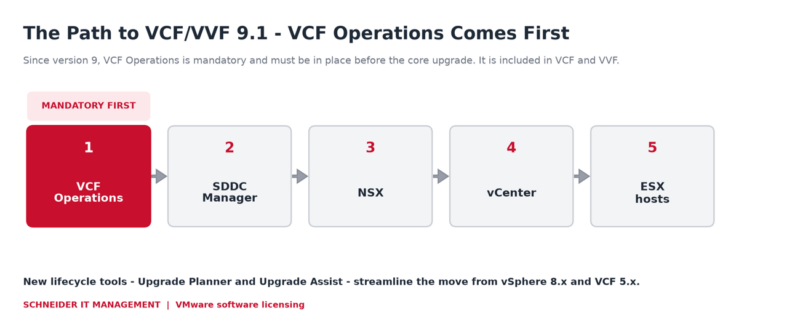
The version 9 upgrade sequence – VCF Operations must be in place first.
Why this is relevant now
When exploitation takes hours, an unpatched estate is exposed almost immediately. Staying on older releases means missing the newest protections, even while scheduled patches continue. Upgrading early reduces risk and shortens exposure and avoids a rushed migration later. Because version 9 also changes how you license and operate the platform, planning protects budget and avoids surprises at renewal.
If you are still mapping the new VMware subscriptions, our VMware licensing guide explains the post-Broadcom model.
What organizations should do now
- Inventory every VCF, VVF, vSphere 8.x, and VCF/VVF 5.x environment and its current version.
- Confirm whether VCF Operations is already deployed, since it is required before any version 9 upgrade.
- Validate your hardware against the VCF 9.1 compatibility list before you set dates.
- Sequence the upgrade – VCF Operations, SDDC Manager, NSX, vCenter, ESX hosts – using Upgrade Planner and Upgrade Assist.
- Review your VCF and VVF entitlements and term dates so the upgrade fits your subscription.
- Prioritize internet-facing and artificial intelligence workloads for the earliest upgrade windows.
Ready to align your VCF and VVF licensing with version 9.1?
Our VMware licensing experts help you confirm what your VCF and VVF subscriptions include – such as VCF Operations – compare 1-, 3-, and 5-year terms, and plan renewals around your upgrade. Contact us to get your VMware licensing right before you move to 9.1.
Sources
For the announcement of VMware Cloud Foundation and vSphere Foundation 9.1, please visit: https://news.broadcom.com/releases/broadcom-announces-vmware-cloud-foundation-9-1.
For useful software licensing information on VMware products, please visit: https://www.schneider.im/software/vmware/.