

Microsoft quietly introduced native electronic signatures in Microsoft 365, called “Microsoft eSignature”. For many organizations, this raises a simple question:
Can Microsoft eSignature replace Adobe Acrobat or DocuSign – or not?
Summary
- Microsoft eSignature supports simple electronic signatures (SES) only
- It is not included in Microsoft 365 licenses and is billed pay‑as‑you‑go
- Adobe Acrobat and DocuSign remain required for advanced and qualified signatures
- All three options can be used side by side and integrated in SharePoint
- Microsoft eSignature is about workflow simplicity, instead of legal strength
What Microsoft eSignature does
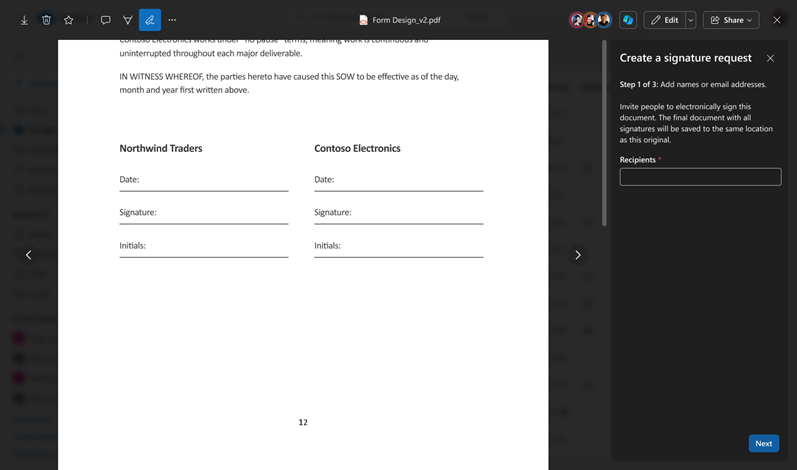
Microsoft eSignature lets users request, sign, and store documents directly in Microsoft 365, mainly:
- PDFs in SharePoint (web)
- Documents in Word (web)
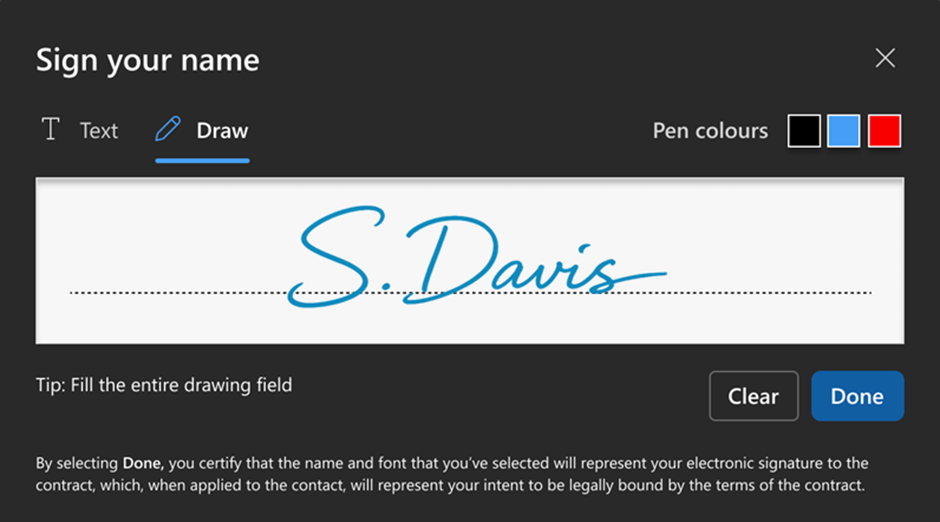
Signatures can be:
- typed, or
- drawn (stylus, touch, mouse – rollout started March 2026)
All documents remain:
- in SharePoint,
- under Microsoft identity (Microsoft Entra ID),
- logged in Microsoft Purview Audit.
Licensing and pricing (important)
- Microsoft eSignature is not bundled with any Microsoft 365 plan
- It requires:
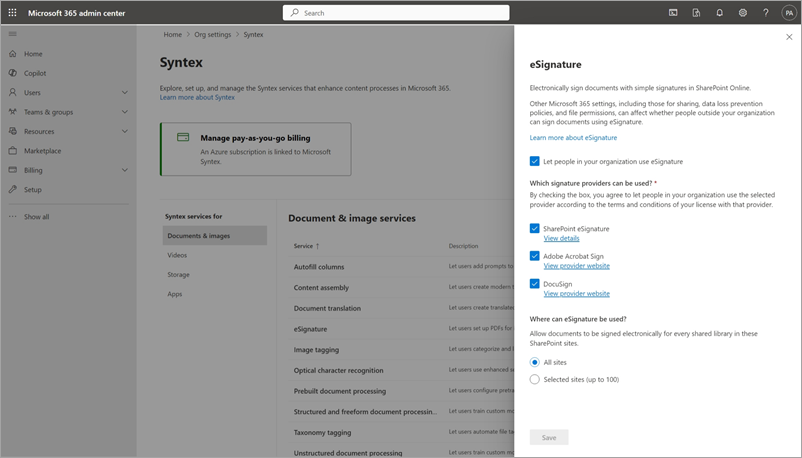
- Pay‑as‑you‑go billing
- a linked Azure subscription
- Price: USD 2 per signature request*
- Trial capacity (until June 2026):
- 5 signature requests per tenant per month included
This makes Microsoft eSignature suitable for low to moderate volume, but not for mass signing.
*Prices in this article are for educational purposes only and are non-binding.
With Microsoft eSignature, you are not paying for legal trust, but for:
- identity binding (internal users and external guests),
- audit logging,
- workflow handling,
- SharePoint‑native storage,
- no separate platform or contracts.
USD 2 per request makes sense when:
- you send few signatures
- you want zero new tools
- the document is low legal risk
Legal validity in the EU
Microsoft eSignature provides simple electronic signatures (SES) under EU eIDAS.
It does not provide:
- advanced electronic signatures (AES)
- qualified electronic signatures (QES)
Legal suitability depends on the document type and is your responsibility.
Let’s compare these three types of signatures:
| Signature type | Simple Electronic Signature (SES) | Advanced Electronic Signature (AES) | Qualified Electronic Signature (QES) |
| Legal basis (EU eIDAS) | Article 3(10) eIDAS | Article 26 eIDAS | Articles 3(12) and 25 eIDAS |
| Typical example | Typed or drawn signature in Microsoft 365 | Certificate‑based signature via Adobe or DocuSign | Signature issued by a qualified trust service provider; can be used in Adobe or DocuSign |
| Identity assurance | Low to medium | High | Very high (verified identity) |
| Integrity protection | Basic | Strong cryptographic protection | Strong cryptographic protection |
| Audit trail | Yes (platform‑based) | Yes (provider‑verified) | Yes (legally regulated) |
| Accepted in regulated industries | Rarely | Often | Yes |
| Typical use cases | Internal approvals, low‑risk documents | Contracts, business agreements | Employment contracts, regulated agreements |
Use cases of types of signatures in the EU
When to use which type of signature:
| Signature type | Simple Electronic Signature (SES) | Advanced Electronic Signature (AES) | Qualified Electronic Signature (QES) |
| Internal approvals | ✅ Yes | ✅ Yes | ❌ Overkill |
| Internal policies confirmation | ✅ Yes | ✅ Yes | ❌ Overkill |
| Customer signs a quote | ⚠️ Risky | ✅ Yes | ❌ Usually not required |
| Sales contracts (B2B) | ❌ Often not | ✅ Yes | ❌ Usually not required |
| Supplier contracts | ❌ Often not | ✅ Yes | ❌ Usually not required |
| NDAs | ❌ Often not | ✅ Yes | ❌ Usually not required |
| Employment contracts | ❌ No | ⚠️ Sometimes | ✅ Yes |
| Documents to authorities | ❌ No | ❌ Often not | ✅ Yes |
| Documents to banks | ❌ No | ⚠️ Sometimes | ✅ Often required |
This makes solutions like Adobe Acrobat Sign or DocuSign still very relevant, especially in regulated environments or industries that require higher signature standards.
Comparison: Microsoft eSignature vs Adobe vs DocuSign
| Topic | Microsoft eSignature | Adobe Acrobat Pro | DocuSign Standard | |||
|---|---|---|---|---|---|---|
| Pricing model | Pay as you go | Subscription per user | Subscription per user | |||
| Typical entry price | USD 2 per request |
approximately USD 24 per user per month |
approximately USD 25 per user per month |
|||
| What you pay for | Each signature request sent | Named users with signature rights | Named users with signature rights | |||
| Volume limits | None inherent, pay per use | Yes, often capped per user | Yes, 100 envelopes per user per year | |||
| Signature levels supported | SES only | SES, AES, QES | SES, AES, QES | |||
| Default signature strength | SES | SES or AES, configurable | SES or AES, configurable | |||
| Upgrade path to QES | Not possible | Possible via qualified trust services | Possible via qualified trust services | |||
| Suitable for regulated contracts | No | Yes | Yes | |||
| Best fit use case | Low risk, internal, low volume | Regulated documents, higher trust | Regulated documents, large scale workflows | |||
Microsoft eSignature does not replace Adobe or DocuSign. These solutions can, however, be used with Microsoft solutions, such as Microsoft Word, through integrations.
How integration works in practice
From Word for the web:
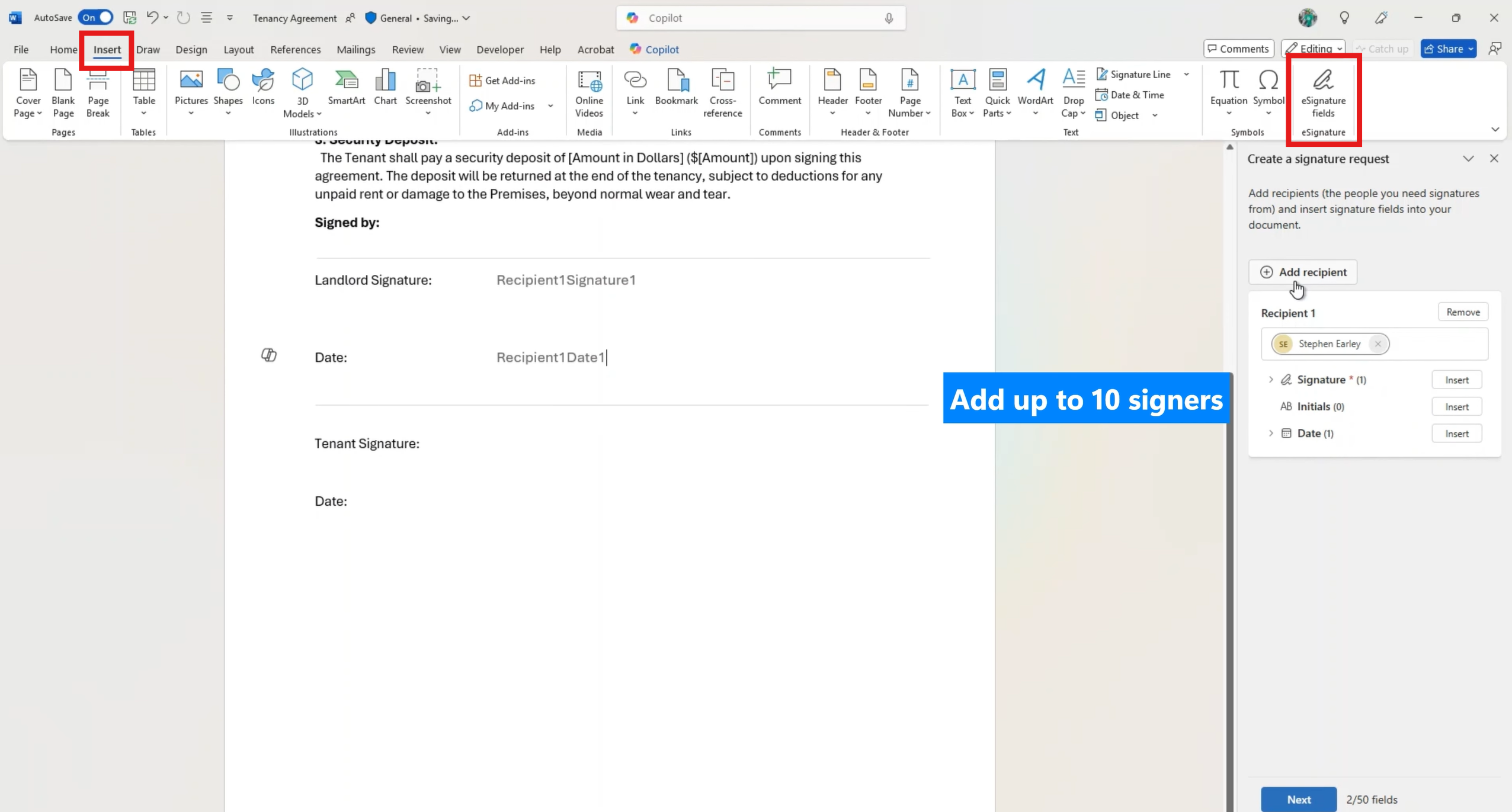
- Open Tab: “Insert”
- Click on “eSignature fields”
- Follow the instructions
From SharePoint for the web, the user:
- Open a PDF
- Click on “Request signature”

- Follow the instructions
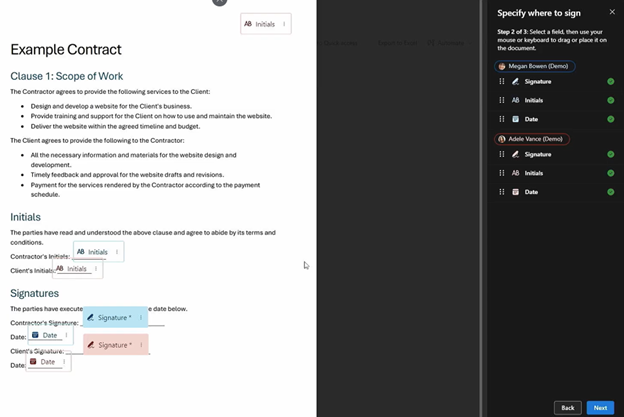
- The signed document is written back to SharePoint automatically
FAQ
Why not always use Adobe or DocuSign?
Because for many documents the legal effort is unnecessary and expensive.
Why would an external recipient accept a Microsoft eSignature?
They often do not have to “accept” anything. SES is legally valid – it just has weaker evidentiary value if challenged.
Is drawn signature more valid than typed?
No. It is only a visual difference.
Is Microsoft eSignature a replacement for LuxTrust?
No. LuxTrust provides QES. Microsoft does not.
Why does Microsoft even offer this?
To reduce basic friction inside Microsoft 365 and cover the 60–70 % of signature use cases that are not regulated.
Bottom line
- Microsoft eSignature is a baseline tool, but not a universal replacement of Adobe or DocuSign signature solutions
- Many organizations already pay for third‑party tools where they are not legally needed
- The real value comes from separating simple from regulated use cases
Recommendation
We typically recommend a hybrid approach:
- Microsoft eSignature for simple, internal, low‑risk cases
- Adobe or DocuSign where legal certainty is required (which is often the case when communicating with external recipients)

Contact our licensing experts to optimize your licensing across publishers to sign with legal safety when required while saving costs.
Sources
Product page: https://adoption.microsoft.com/en-us/document-processing/esignature/.
Overview of eSignature: https://learn.microsoft.com/en-us/microsoft-365/documentprocessing/esignature-overview.
Included eSignature requests: https://learn.microsoft.com/en-us/microsoft-365/documentprocessing/promo-syntex.
Set up pay-as-you-go billing for document processing: https://learn.microsoft.com/en-us/microsoft-365/documentprocessing/syntex-azure-billing.
How to set up eSignature: https://learn.microsoft.com/en-us/microsoft-365/documentprocessing/esignature-setup.
eSignature in Microsoft Word: https://youtu.be/1S8HDKYPIA4?si=HNPCAidwh3kZzZwI.